Q.1.
Columns on a spreadsheet run _______________.
-
67%
vertically
-
0%
diagonally
-
33%
horizontally
-
0%
really, really fast
Q.2.
Rows on a spreadsheet run ____________.
-
100%
horizontally
-
0%
diagonally
-
0%
vertically
-
0%
much faster than columns
Q.3.
A ____________ is where a row and column meet.
-
0%
sheet
-
0%
formula
-
0%
blank
-
100%
cell
Q.4.
Rows are labeled by __________.
-
100%
numbers
-
0%
letters
-
0%
symbols
-
0%
colors
Q.5.
Columns are labeled by ______________.
-
0%
numbers
-
100%
letters
-
0%
symbols
-
0%
colors
Q.6.
Spreadsheets work much like the game ________________.
-
50%
Monopoly
-
50%
Minecraft
-
0%
Battleship
-
0%
Yahtzee
Q.7.
Which symbol tells the computer you want to create an equation or formula?
-
0%
$
-
0%
+
-
100%
=
-
0%
-
Q.8.
What does this icon represent?
-
100%
sheets
-
0%
slides
-
0%
docs
-
0%
classroom
Q.9.
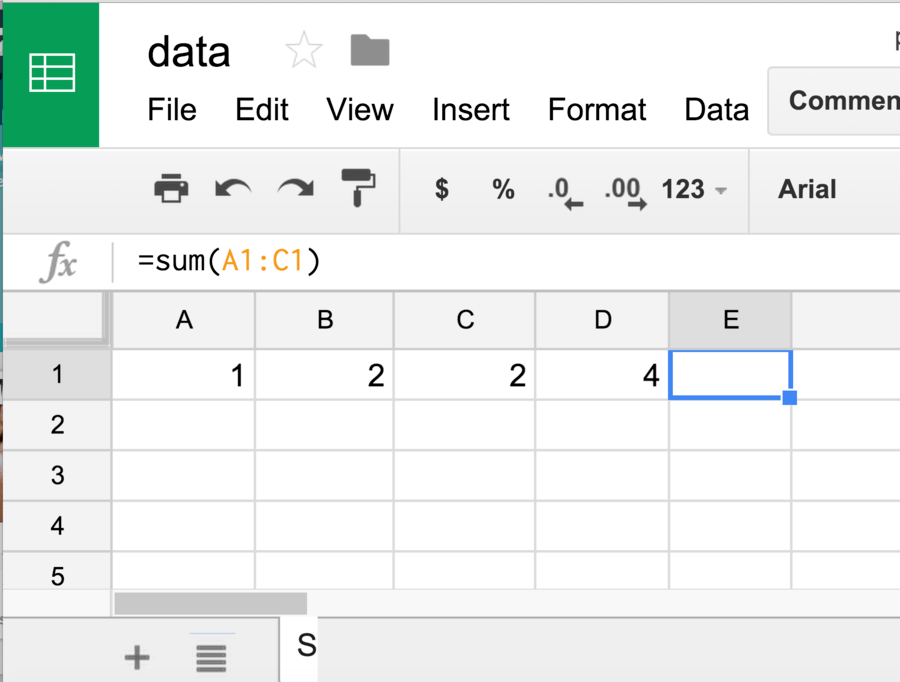
What number should be in cell E1 (based on the formula)?
-
0%
1
-
0%
2
-
50%
5
-
50%
9
Q.10.
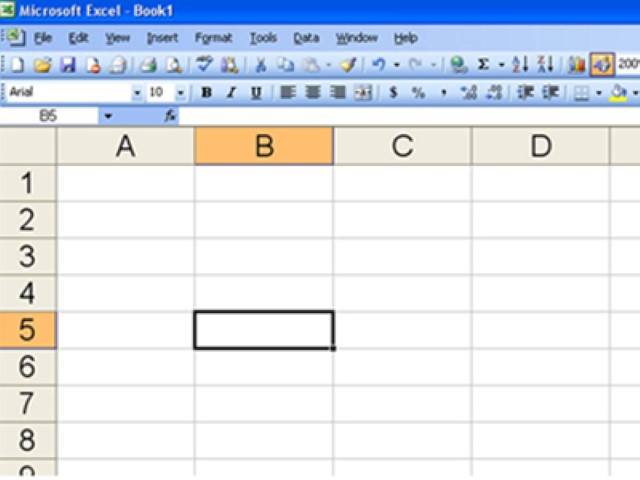
What is the name of this cell?
-
0%
B10
-
0%
5B
-
100%
B5
-
0%
you cannot know the name from this picture
Q.11.
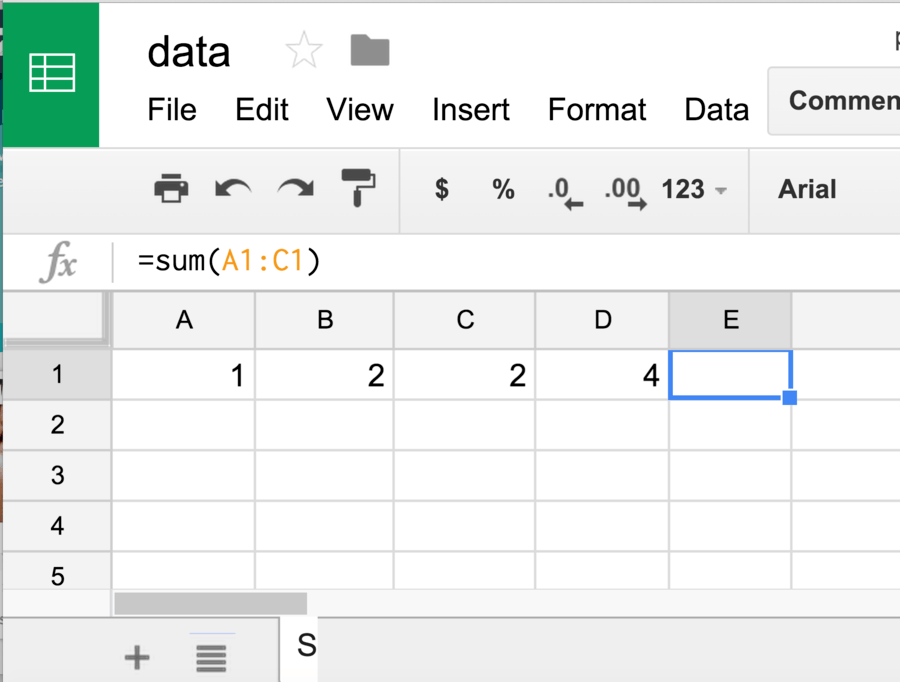
=A1*B1
-
100%
2
-
0%
3
-
0%
4
-
0%
Error
Q.12.
This cursor allows you to click and hold the mouse to move the contents of that cell anywhere.
-
50%
Skinny Plus Sign
-
0%
Hand
-
50%
Arrow
-
0%
Fat Plus Sign
Q.13.
Select ______________ from the functions drop-down menu to add a set of numbers.
-
0%
average
-
50%
count
-
0%
max
-
50%
sum
Q.14.
Text wrapping in Sheets means the text will be on more than 1 line within the cell.
-
50%
True
-
50%
False
Q.15.
You can have multiple sheets within the same Google Sheet document.
-
100%
True
-
0%
False
Q.16.
You can not give an exact size for a row height or column width.
-
0%
True
-
100%
False
Q.17.
It is possible to insert images in Google Sheets
-
100%
True
-
0%
False
Q.18.
A cell you are currently working on
-
0%
Active Cell
-
0%
Auto Sum
-
100%
Cell Reference
-
0%
Column
Q.19.
A visual representation of data
-
100%
Graph
-
0%
Grid Lines
-
0%
Row
-
0%
Selecting
Q.20.
To highlight a set of cells
-
100%
Graph
-
0%
Grid Lines
-
0%
Row
-
0%
Selecting
Q.21.
Tabs that identify the worksheets in a workbook
-
100%
Sheet Tabs
-
0%
Spreadsheets
-
0%
Value
-
0%
Workbook
-
0%
Worksheet
Q.22.
Which is the correct formula to add cells A1 to A5?
-
100%
=SUM(A1+A5)
-
0%
=SUM(A1:A5)
-
0%
=A1+A2+A3
-
0%
=SUM(A1:A4)
Q.23.
What does this icon represent?
-
100%
sheets
-
0%
slides
-
0%
docs
-
0%
classroom
Q.24.
What number should be in cell E1 (based on the formula)?
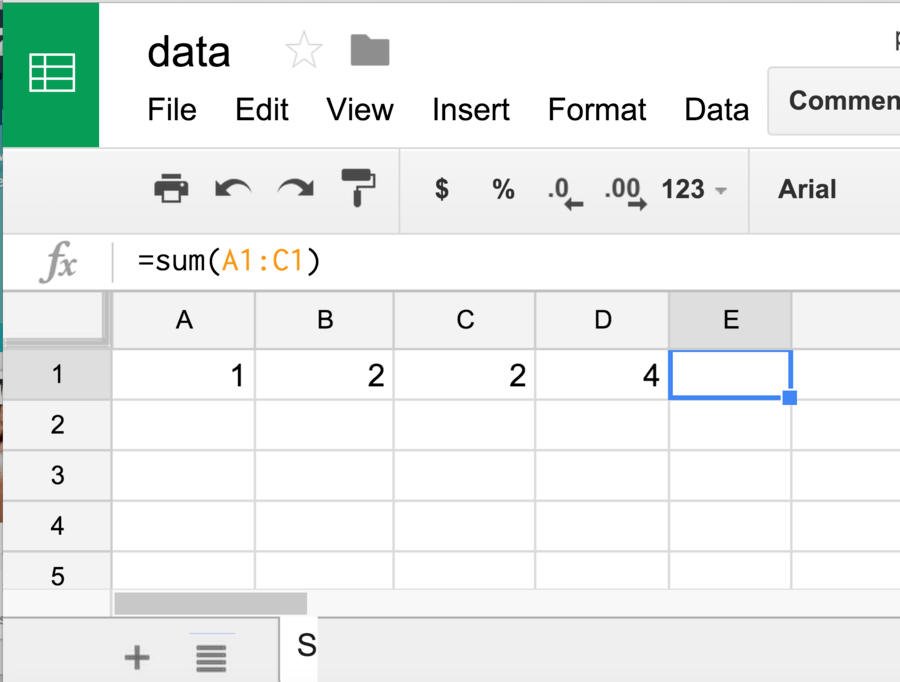
-
0%
1
-
0%
2
-
100%
5
-
0%
9
Q.25.
What is the name of this cell?
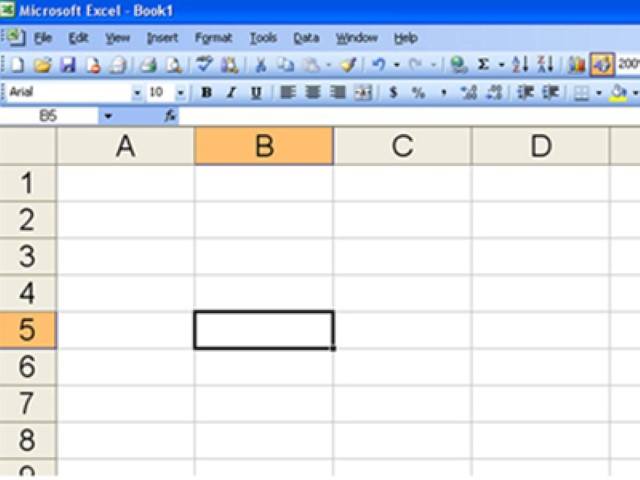
-
0%
B10
-
0%
5B
-
100%
B5
-
0%
you cannot know the name from this picture
Q.26.
=A1*B1
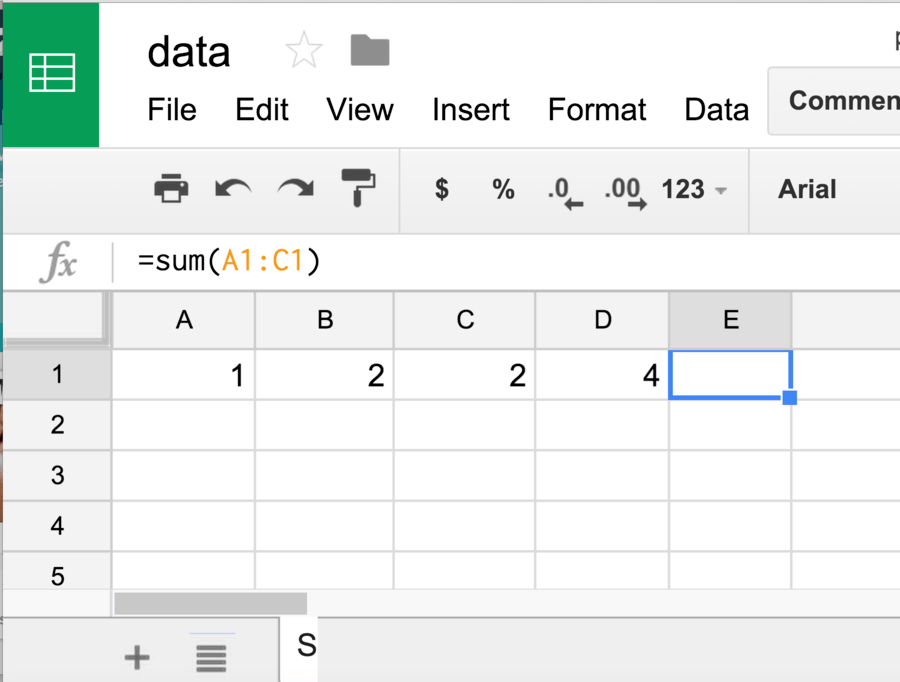
-
100%
2
-
0%
3
-
0%
4
-
0%
Error
Q.27.
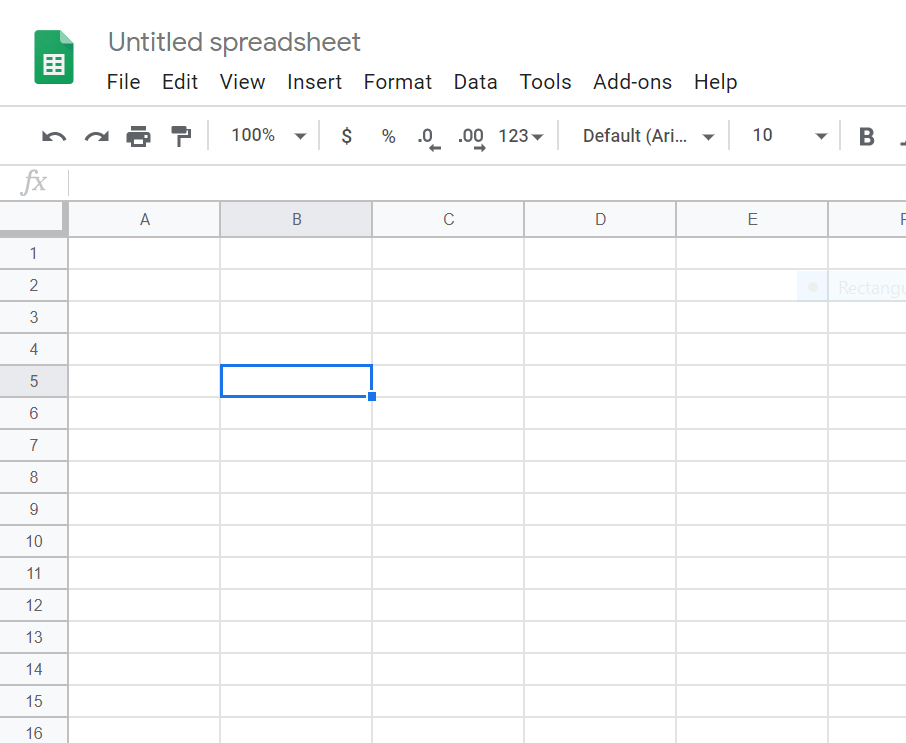
What is the name of this cell?
-
0%
B10
-
0%
5B
-
100%
B5
-
0%
you cannot know the name from this picture
Q.28.
All formulas in Google sheets begin with the following symbol:
-
0%
+
-
0%
-
-
100%
=
-
0%
%
Q.29.
Which of the following is a correctly named cell?
-
100%
8B
-
0%
B8
-
0%
8-B
-
0%
BB-8
Q.30.
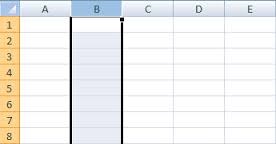
What is a vertical section of a spreadsheet?
-
0%
row
-
0%
cell
-
100%
column
-
0%
format
Q.31.
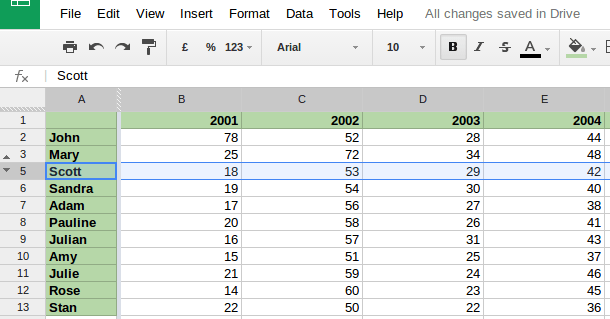
In a Google Spreadsheet, the numbers down the left side represent __________.
-
100%
Rows
-
0%
Columns
-
0%
Headers
-
0%
Functions
Q.32.
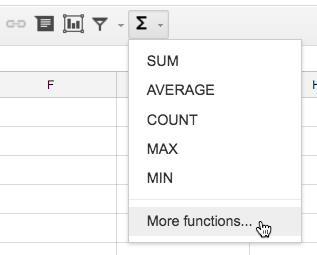
In a Google Spreadsheet, selecting the SUM function from the toolbar will perform what mathematical option?
-
0%
Subtraction
-
0%
Multiplication
-
0%
Division
-
100%
Addition
Q.33.
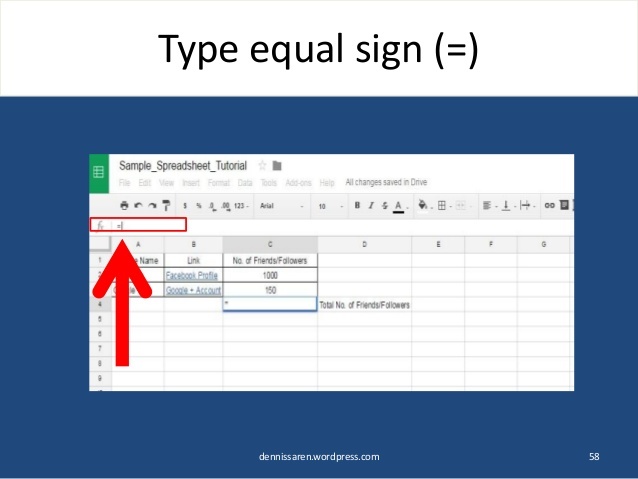
In a Google Spreadsheet, the first thing you should type in a cell where you want to insert a formula/function to get an answer is a(n) ____________.
-
0%
Plus sign
-
0%
Minus sign
-
100%
Equal sign
-
0%
Multiplication sign
Q.34.
In a Google Spreadsheet, you can manually type the function/formula in a cell if the operation is not available in the function drop-down list.
-
100%
True
-
0%
False
Q.35.
Double-clicking between two columns will ____________ the column.
-
0%
Delete
-
100%
Copy
-
0%
Resize
-
0%
Fill
Q.36.
A Sheets document is called a?
-
0%
Work page
-
0%
Work paper
-
100%
Spreadsheet
-
0%
Slide
Q.37.
Columns run _______________.
-
100%
vertically
-
0%
diagonally
-
0%
horizontally
-
0%
really, really fast
Q.38.
Rows run ____________.
-
100%
horizontally
-
0%
diagonally
-
0%
vertically
-
0%
much faster than columns
Q.39.
A spreadsheet is made up of all of the following EXCEPT
-
0%
Rows
-
0%
Cells
-
100%
Pictures
-
0%
Columns
Q.40.
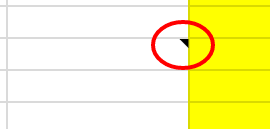
The little triangle in the top right corner of a cell means there is a ________ with that cell.
-
100%
formula
-
0%
number
-
0%
letter
-
0%
note
Q.41.
Which cursor allows you to drag and fill a series?
-
0%
Skinny Plus Sign
-
0%
Fat Plus Sign
-
100%
Hand
-
0%
Arrow
Q.42.
Which cursor would you use to auto fit content in a column?
-
0%
vertical line with arrows pointing left and right
-
0%
plus sign
-
100%
hand
-
0%
white arrow
Q.43.
Which of the following is NOT a spreadsheet?
-
0%
Google Sheets
-
100%
Microsoft Excel
-
0%
Google Docs
-
0%
none of the above
Q.44.
Which symbol tells the computer you want to create a formula?
-
0%
-
-
0%
+
-
100%
=
-
0%
/
Q.45.
What is this icon?
-
0%
classroom
-
0%
gmail
-
100%
sheets
-
0%
docs
Q.46.
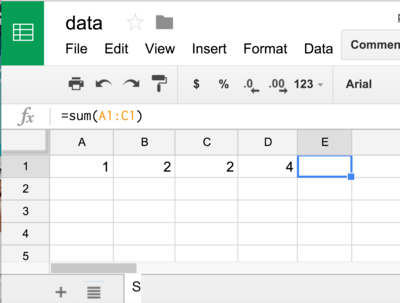
What number should be in E1 (based on the formula)?
-
0%
1
-
0%
2
-
0%
2
-
100%
5
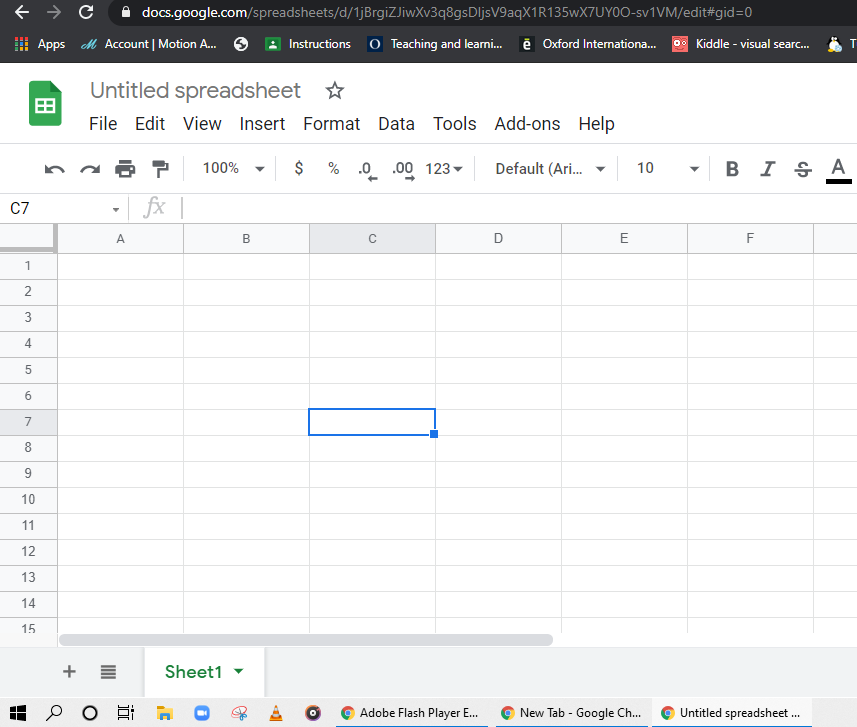
Q.47.
What is the active cell?
-
0%
A1
-
0%
B2
-
100%
C7
-
0%
D7
Q.48.
You can not adjust a row height or column width.
-
100%
True
-
0%
False
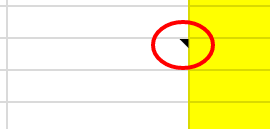
Q.49.
The little triangle in the top right corner of a cell means there is a ________ with that cell.
-
0%
formula
-
0%
number
-
0%
letter
-
100%
note
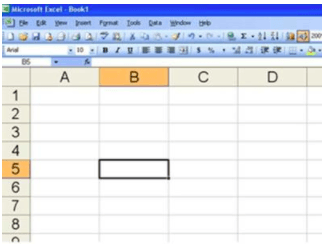
Q.50.
What is the name of this cell?
-
0%
B10
-
0%
5B
-
100%
B5
-
0%
You cannot know the name from this picture
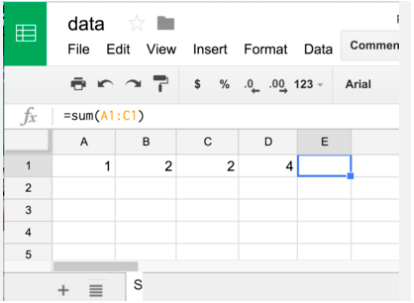
Q.51.
B1 is called
-
0%
Row
-
100%
Cell
-
0%
Column
-
0%
Sheet
Q.52.
Select ______________ from the functions drop-down menu to add a set of numbers together.
-
0%
Average
-
0%
Count
-
0%
Max
-
100%
Sum
Q.53.
Select ___________________ from the functions menu to find the smallest value in a group.
-
0%
Max
-
100%
Min
-
0%
Sum
-
0%
Average
Q.54.
Which item is FALSE regarding charts in Google Sheets?
-
0%
You can create pie and line charts.
-
100%
Charts can't be inserted on their own sheet.
-
0%
You can change the chart title.
-
0%
You can put a background color on your chart.
Q.55.
Text wrapping in Sheets means the text will be on more than 1 line within the same cell.
-
100%
True
-
0%
False
Q.56.
You can have multiple sheets within the same Google Sheet document.
-
100%
True
-
0%
False
Q.57.
You can not adjust a row height or column width.
-
0%
True
-
100%
False
Q.58.
Merging cells automatically centers the text within the merged cells.
-
100%
True
-
0%
False
Q.59.
It is possible to insert images in Google Sheets
-
100%
True
-
0%
False
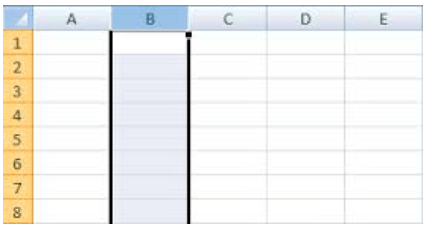
Q.60.
What is the name of a vertical section of a spreadsheet as selected in the image?
-
0%
Row
-
0%
Cell
-
100%
Column
-
0%
Format
Q.61.
It is possible to change the color of a cell border.
-
100%
True
-
0%
False
Q.62.
The only colors you can change your sheet tabs to are red, blue, green, or yellow.
-
100%
True
-
0%
False
Q.63.
Why would you want to change the column width?
-
0%
To make sure the title is visible
-
0%
To make sure headings are always visible
-
0%
To make sure all of the numbers are visible
-
0%
All of the Above
-
100%
None of the Above
Q.64.
What is horizontal (left to right)?
-
100%
Row
-
0%
Addition
-
0%
Column
-
0%
Format
Q.65.
If I want to add a Chart, one way is to select the ____________ tab.
-
0%
Home
-
100%
Insert
-
0%
Page
-
0%
Data
Q.66.
If I want to make a cell a particular color, which button would I click on?
-
100%
Format tab
-
0%
Font style
-
0%
Text color
-
0%
Fill color
Q.67.
What color is the Sheets app?
-
0%
purple
-
0%
red
-
0%
yellow
-
100%
green
Q.68.
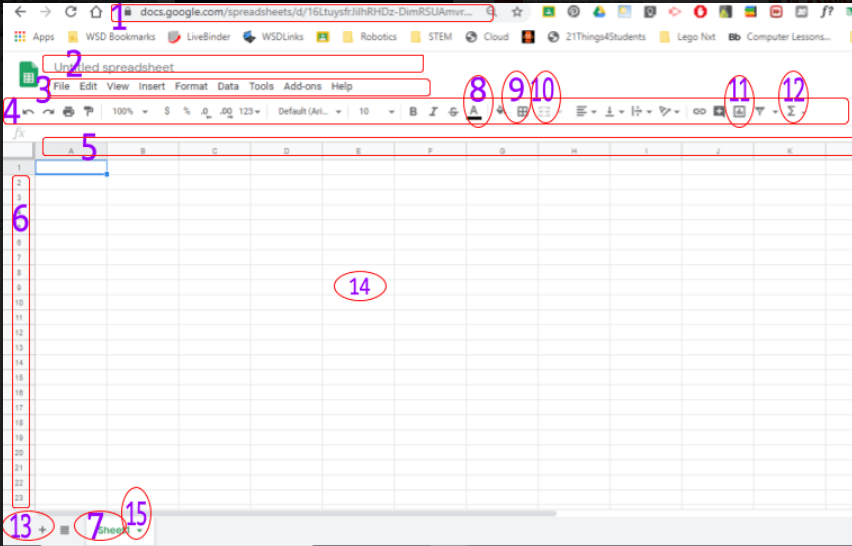
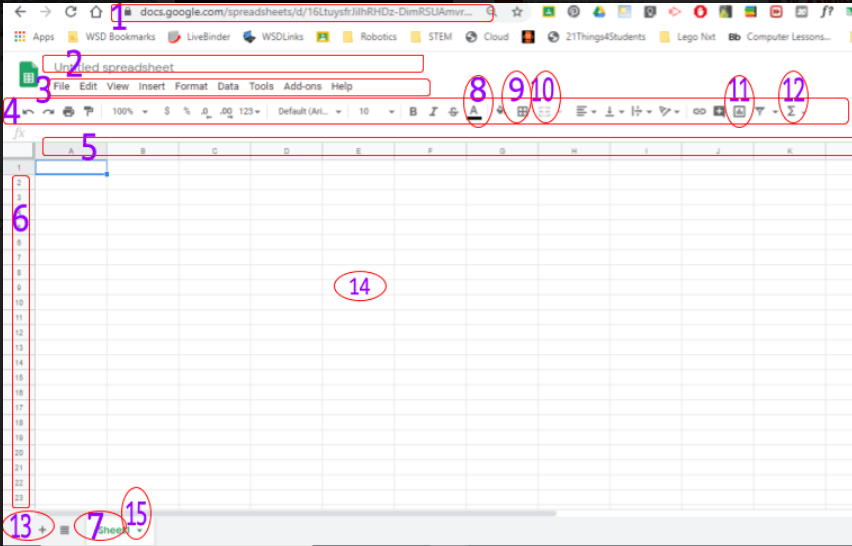
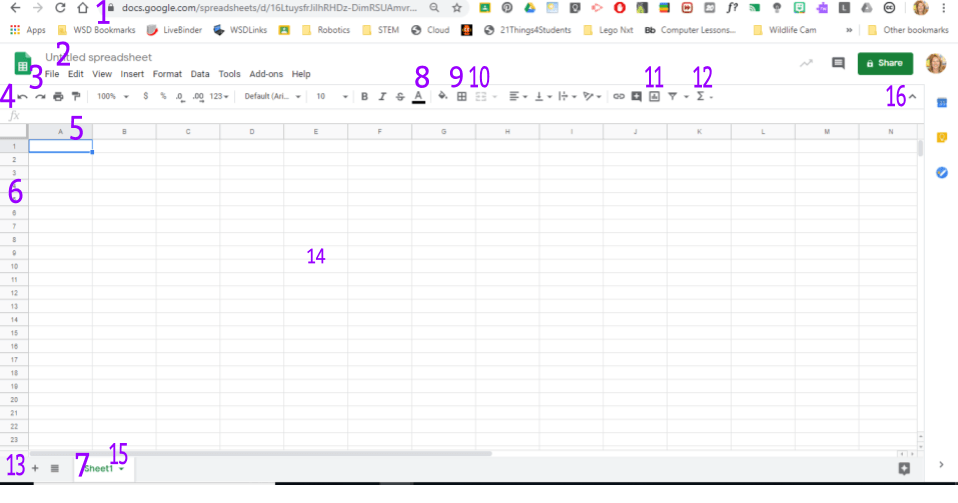
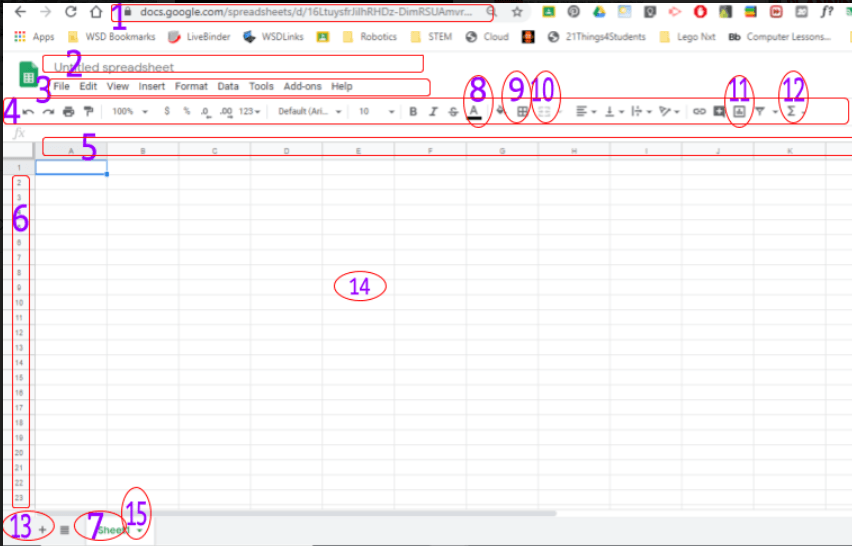
What number is the shortcut toolbar?
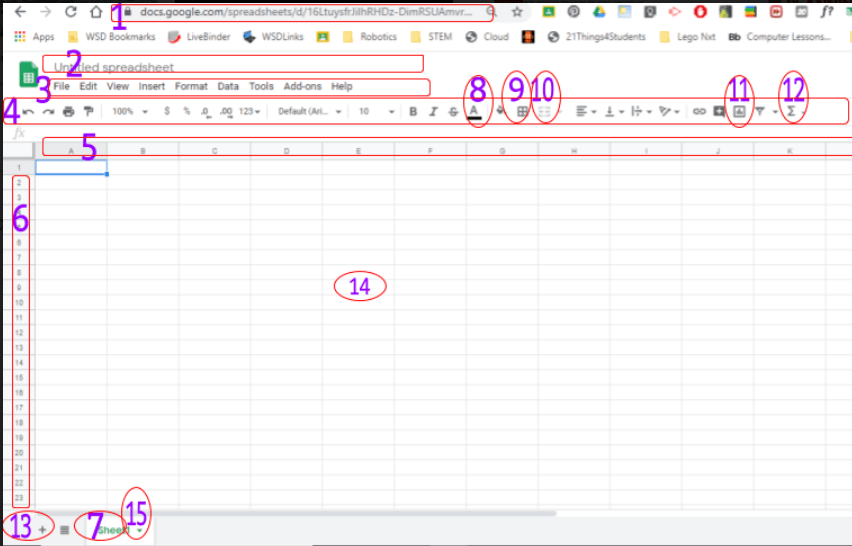
-
0%
1
-
0%
2
-
100%
3
-
0%
4
Q.69.
What number is the word toolbar?
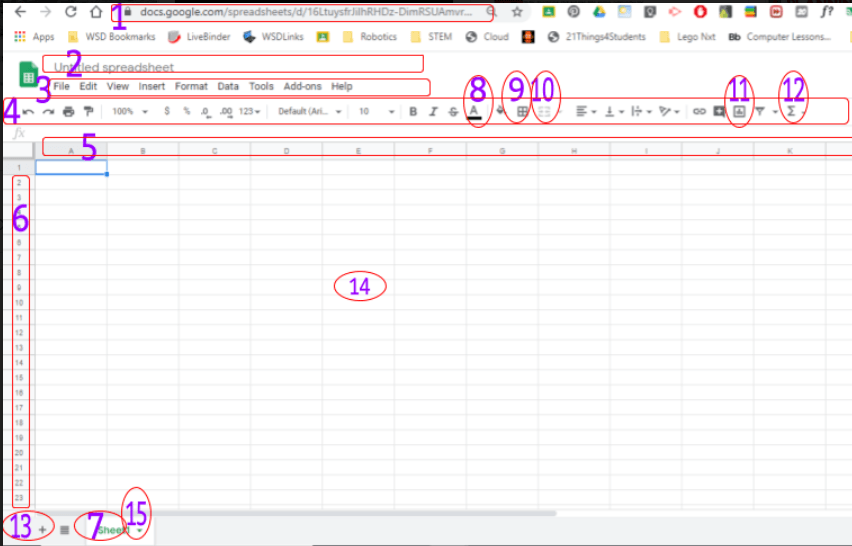
-
0%
1
-
0%
2
-
100%
3
-
0%
4
Q.70.
What number is the url?
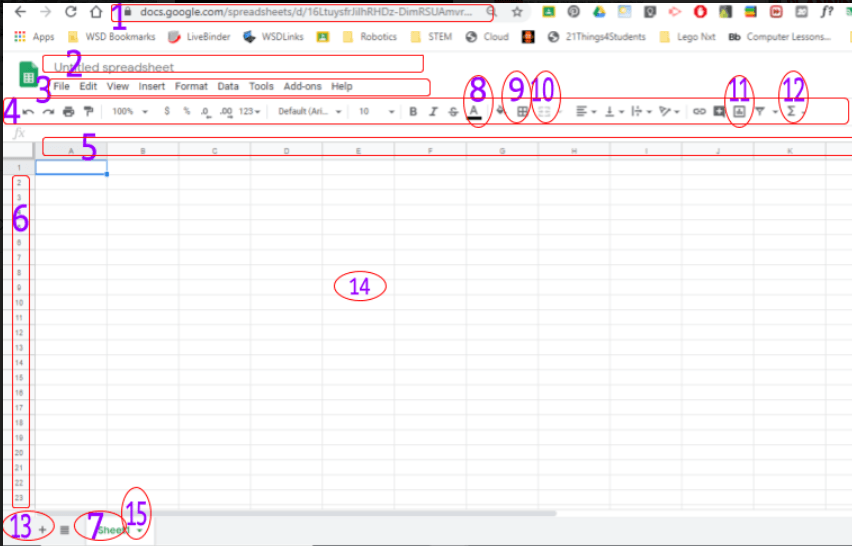
-
100%
1
-
0%
2
-
0%
3
-
0%
4
Q.71.
What number is the sheet title?
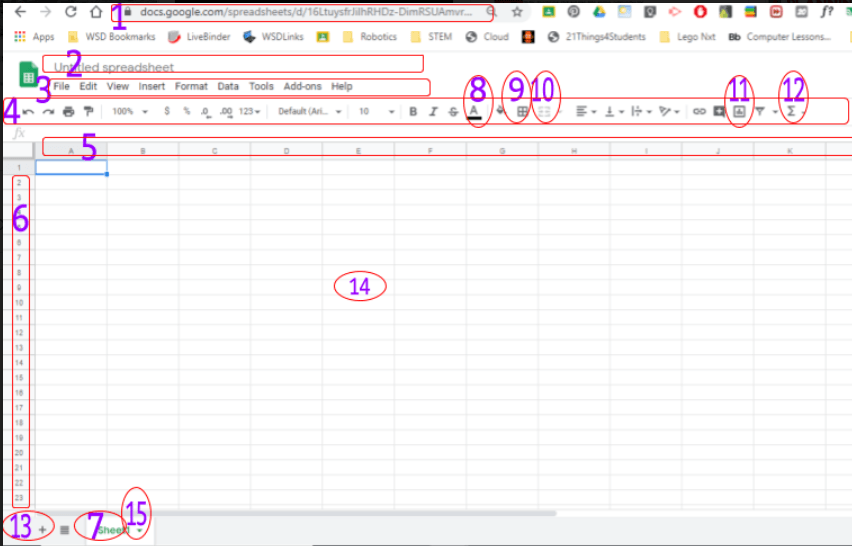
-
0%
10
-
100%
2
-
0%
8
-
0%
6
Q.72.
What number is the function key (for math formulas)?
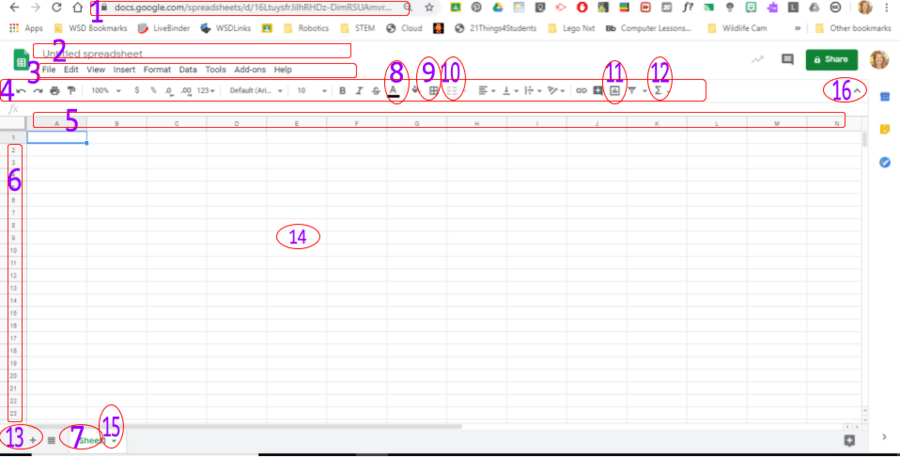
-
100%
12
-
0%
16
-
0%
13
-
0%
10
Q.73.
To add the total of a column or row, you select Function and ...
-
0%
Add
-
0%
Sum
-
0%
Total
-
0%
Help
Q.74.
What number is the border shortcut?
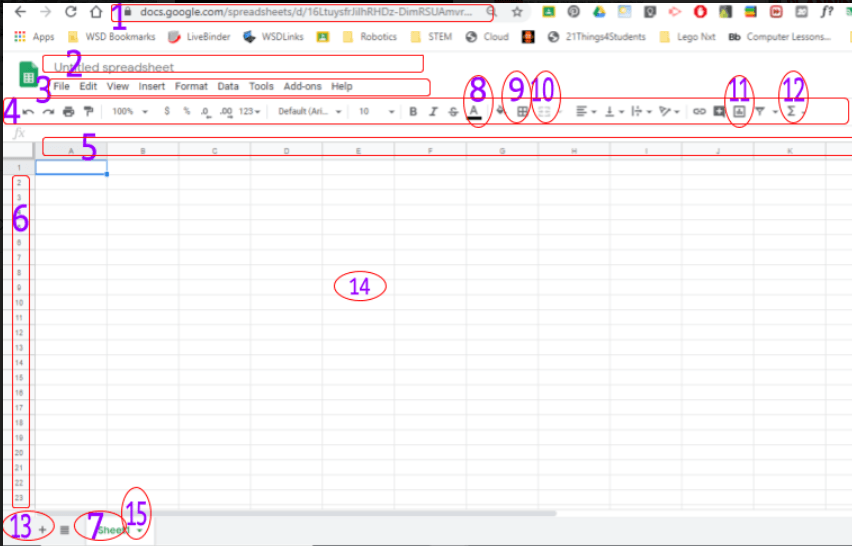
-
0%
8
-
0%
11
-
0%
9
-
0%
4
Q.75.
What number is the chart shortcut?
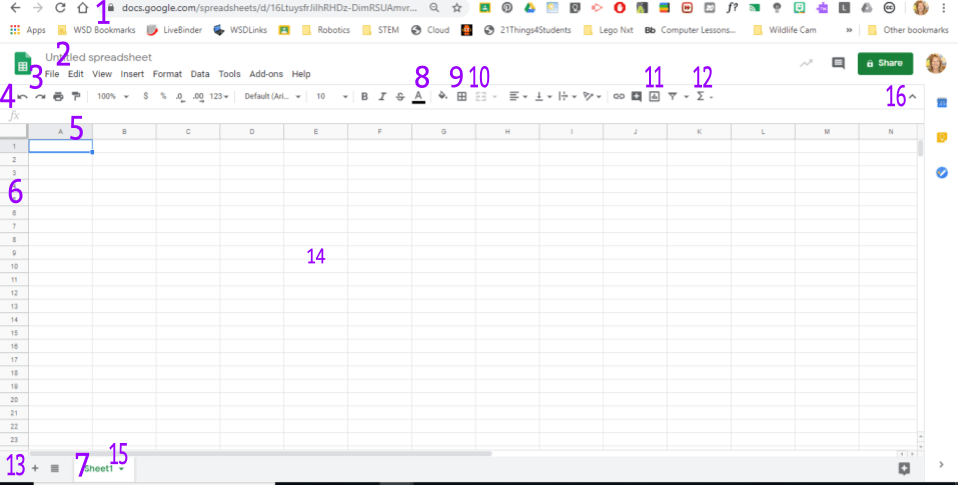
-
0%
8
-
0%
11
-
0%
9
-
0%
4
Q.76.
What number is the tab?
-
0%
7
-
0%
13
-
0%
6
-
0%
14
Q.77.
How do you rename the tab?
-
0%
7
-
0%
13
-
0%
15
-
0%
14
Q.78.
Which number is a cell?
-
0%
5
-
0%
6
-
0%
14
-
0%
13
Q.79.
Which number is a row?
-
0%
5
-
0%
6
-
0%
14
-
0%
13
Q.80.
If I can't see my sheet title or toolbar, I should click on...
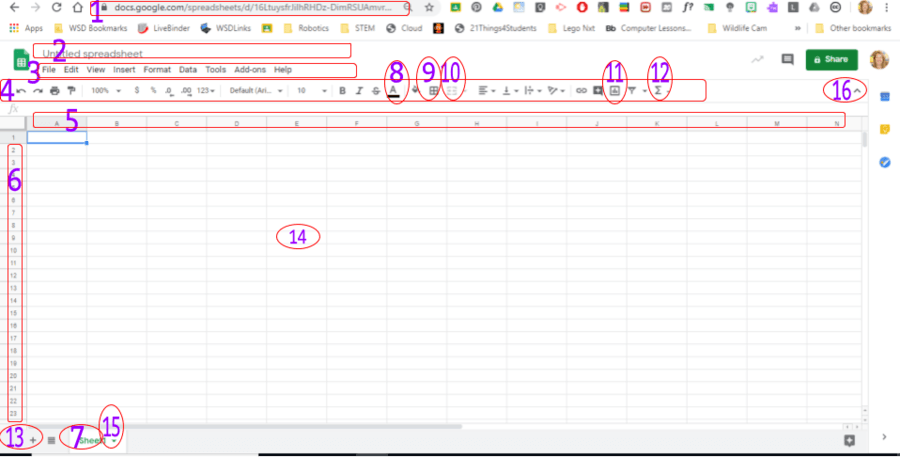
-
0%
13
-
0%
4
-
0%
16 carat
-
0%
5
Q.81.
To move a chart to its own sheet, you need to click on the...
-
0%
tab
-
0%
toolbar
-
0%
3 dots
-
0%
column
Q.82.
In Google Sheets, rows are identified by
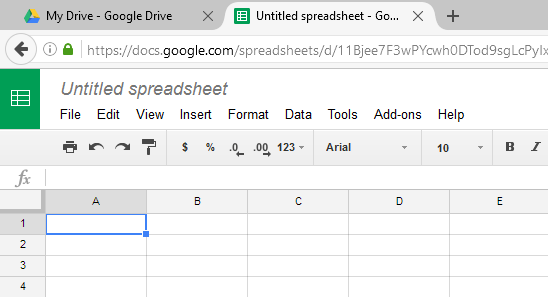
-
0%
Letters
-
0%
Numbers
Q.83.
In Google Sheets, columns are identified by
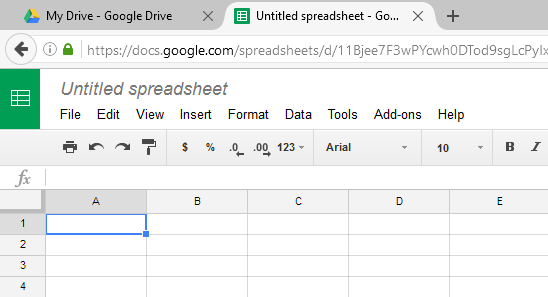
-
0%
Letters
-
0%
Numbers
Q.84.
In a spreadsheet, what is the small box where a row and column meet called?
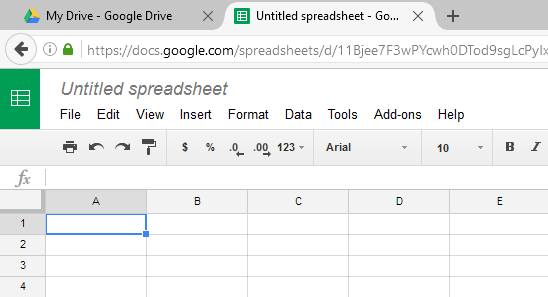
-
0%
Compartment
-
0%
File
-
0%
Cell
-
0%
Formula
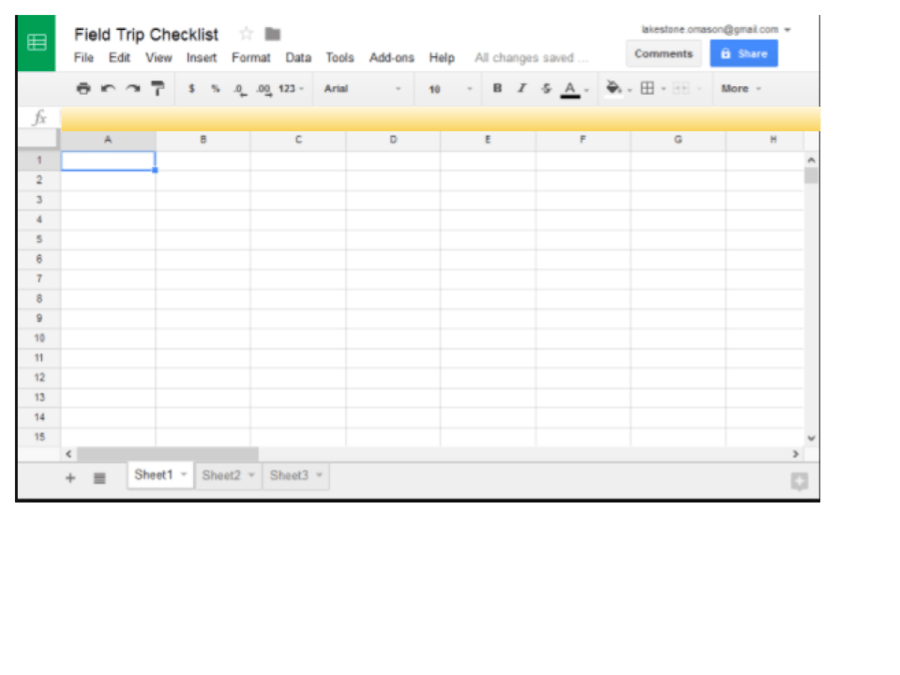
Q.85.
What is the name of the yellow highlighted area?
-
0%
Task bar
-
0%
Formula bar
-
0%
Tool bar
-
0%
Functions
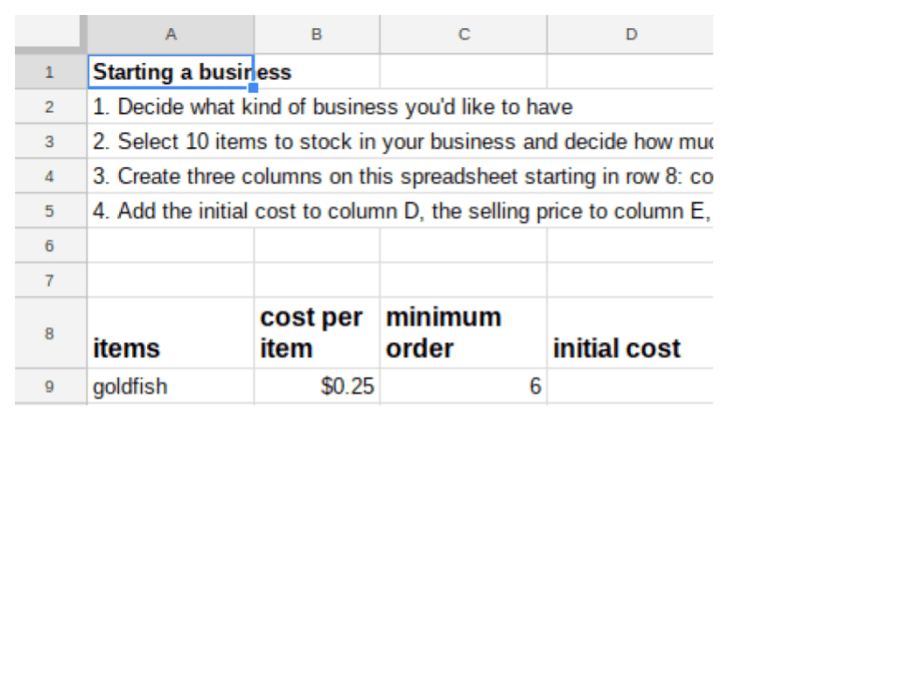
Q.86.
Using cell references, select the correct formula for calculating the initial cost of goldfish.
-
0%
=b9*c9
-
0%
b9*c9
-
0%
.25*6
-
0%
=.25*6
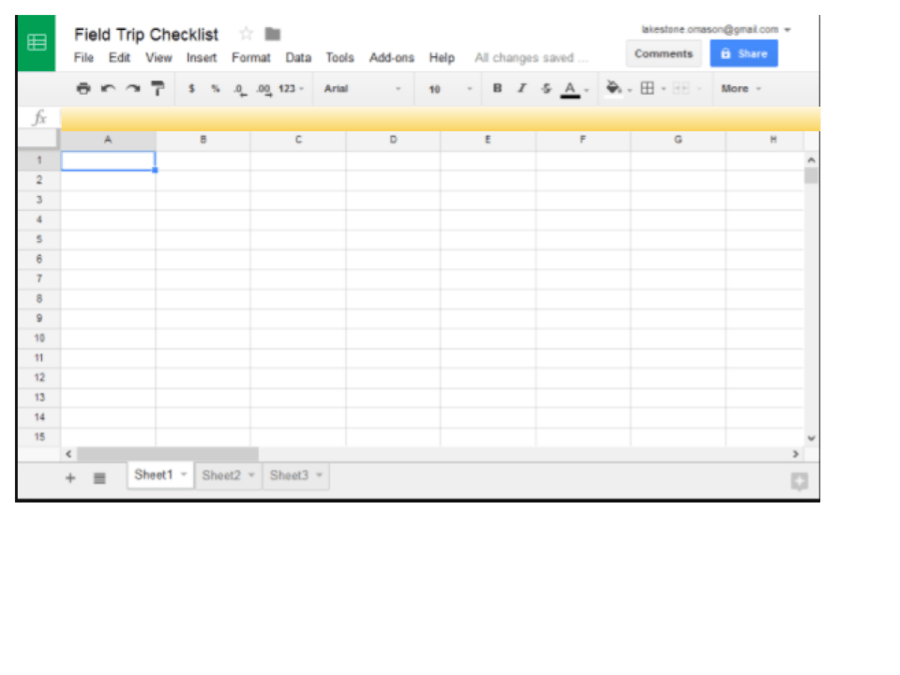
Q.87.
I forgot to add a column. Which menu should I use?
-
0%
File
-
0%
Edit
-
0%
Format
-
0%
Insert
Q.88.
Which of the following options will allow all text to fit into one cell without spilling into the next column?
-
0%
Overflow
-
0%
Text wrapping
-
0%
Clip
Q.89.
Which of the following can you do in a spreadsheet?
-
0%
Sort in alphabetical order
-
0%
Sort in number order
-
0%
Sort in reverse alphabetical order
-
0%
Sort in reverse number order
-
0%
All of these can be done using spreadsheets
Q.90.
What is a spreadsheet?
-
0%
An application to processes text and pictures.
-
0%
An application to organise, analyse and store data in a tabular form.
-
0%
An application to draw and edit images.
-
0%
An application to present slides to a large group of audience.
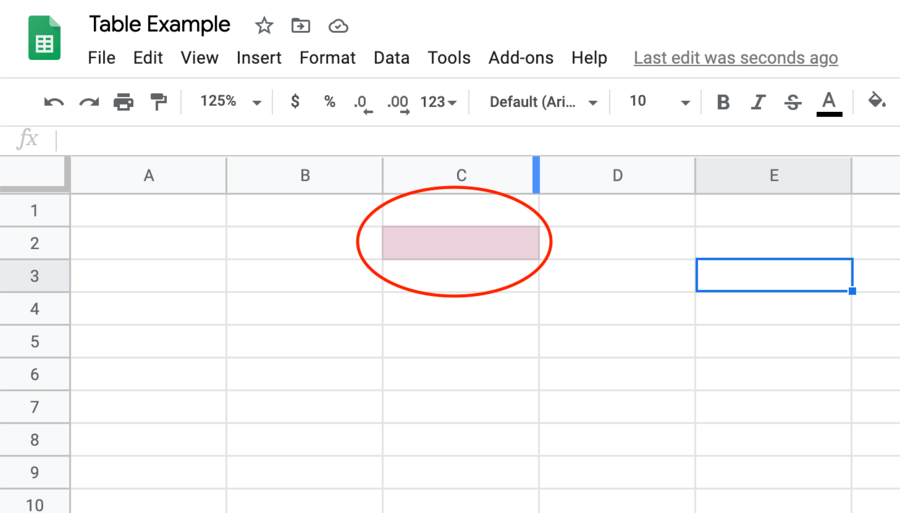
Q.91.
This is called a...
-
0%
Box
-
0%
Cube
-
0%
Rectangle
-
0%
Cell
Q.92.
The space highlighted in blue is called a...
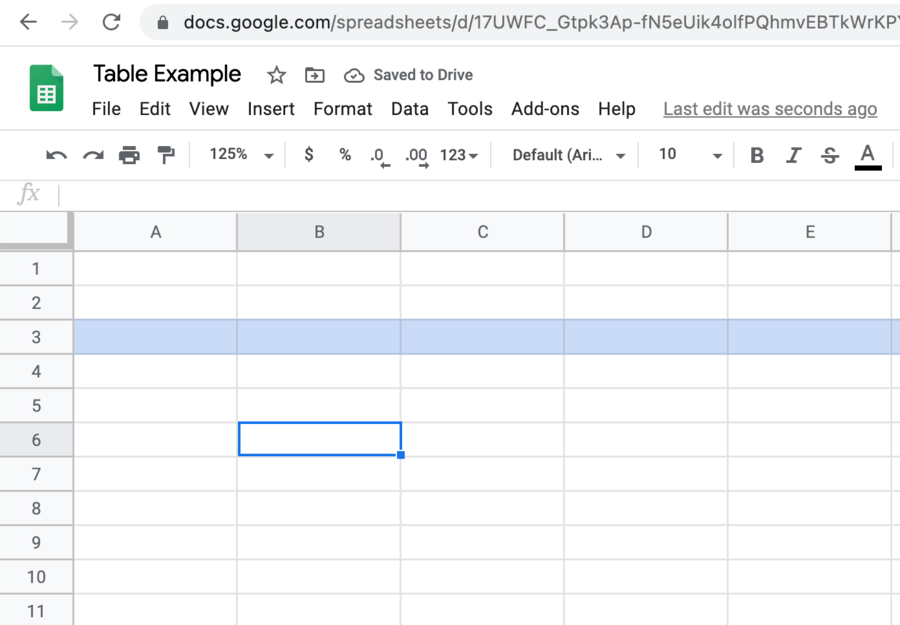
-
0%
Line
-
0%
Horizontal
-
0%
Row
-
0%
Column
Q.93.
The space highlighted in yellow is called a...
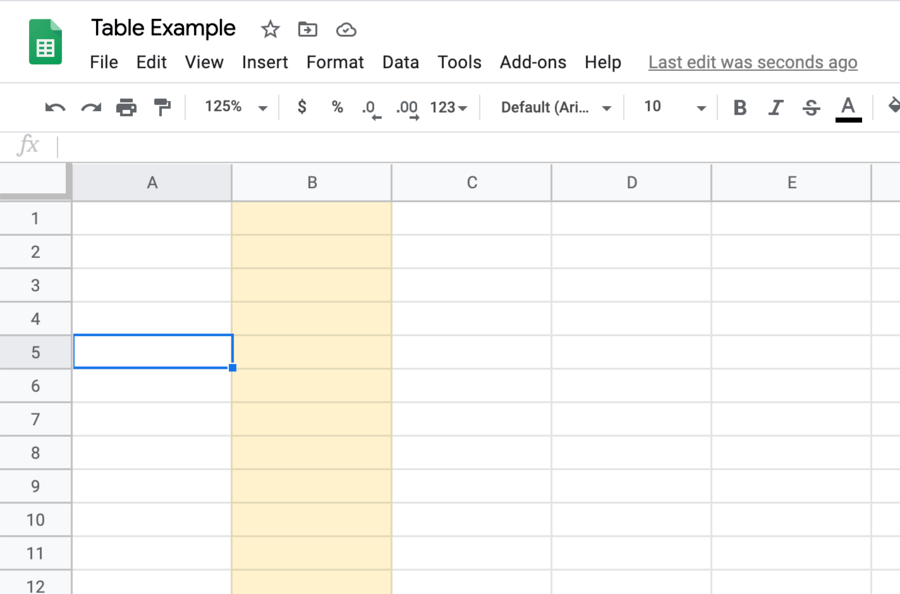
-
0%
Row
-
0%
Column
-
0%
Path
-
0%
Line
Q.94.
What is the Cell Reference for the highlighted cell?
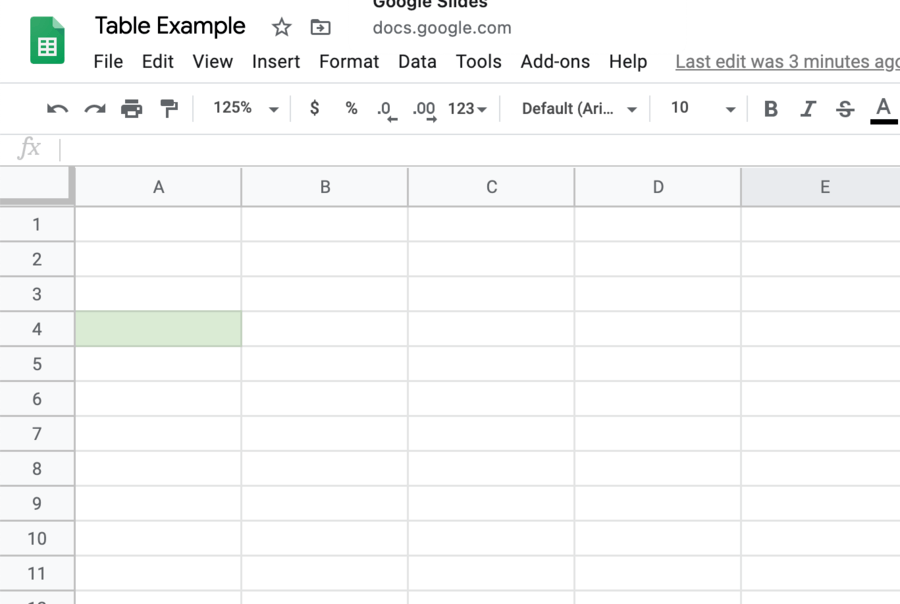
-
0%
B3
-
0%
A4
-
0%
A7
-
0%
C5
Q.95.
What is the Cell Reference for the highlighted cell?
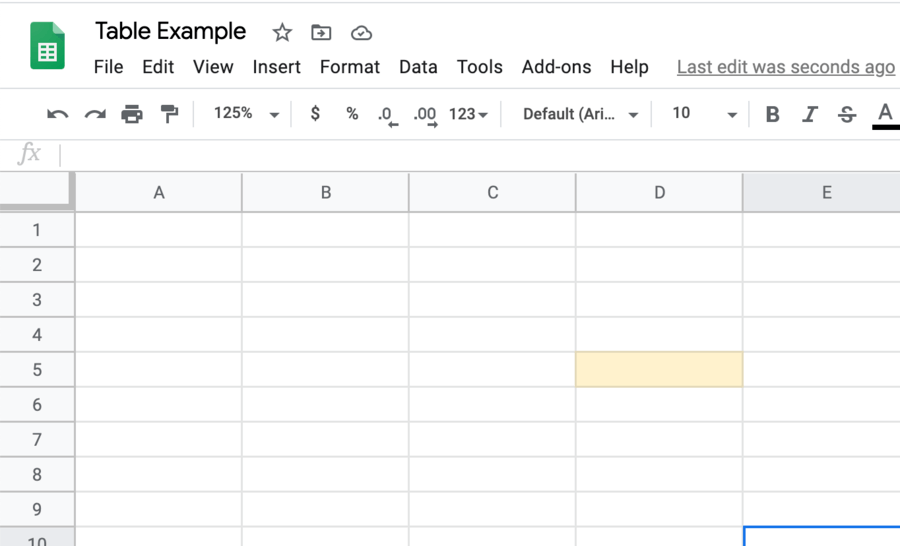
-
0%
D4
-
0%
C5
-
0%
E5
-
0%
D5
Q.96.
Clicking on the button circled in red will allow user to...
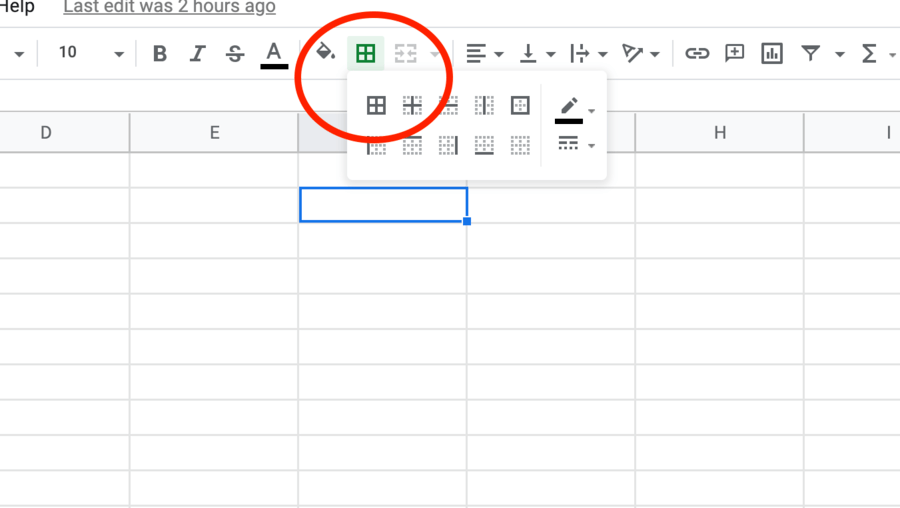
-
0%
Colour the selected cells.
-
0%
Draw borders on the selected cells.
-
0%
Add the numbers in the selected cells.
-
0%
Draw small squares in the selected cells.
Q.97.
When user clicks on the button circled in red, user will be able to...
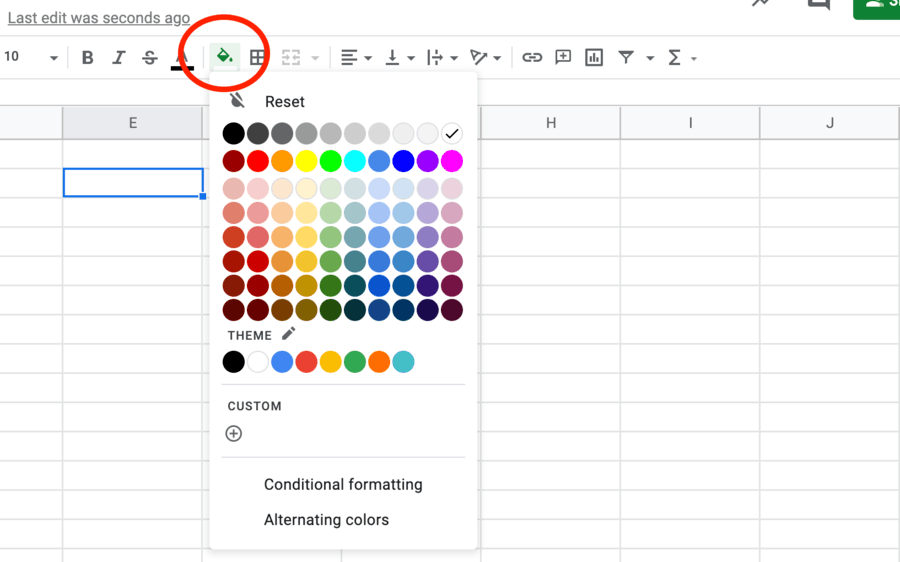
-
0%
Fill selected cells with colour.
-
0%
Draw borders around selected cells.
-
0%
Fill selected cells with patterns.
-
0%
Fill selected cells with text.
Q.98.
What can a spreadsheet be used for?
-
0%
To record information in an organised manner.
-
0%
To perform mathematical calculations.
-
0%
To generate graphs and pie charts.
-
0%
All of the above.
Q.99.
This is called a...
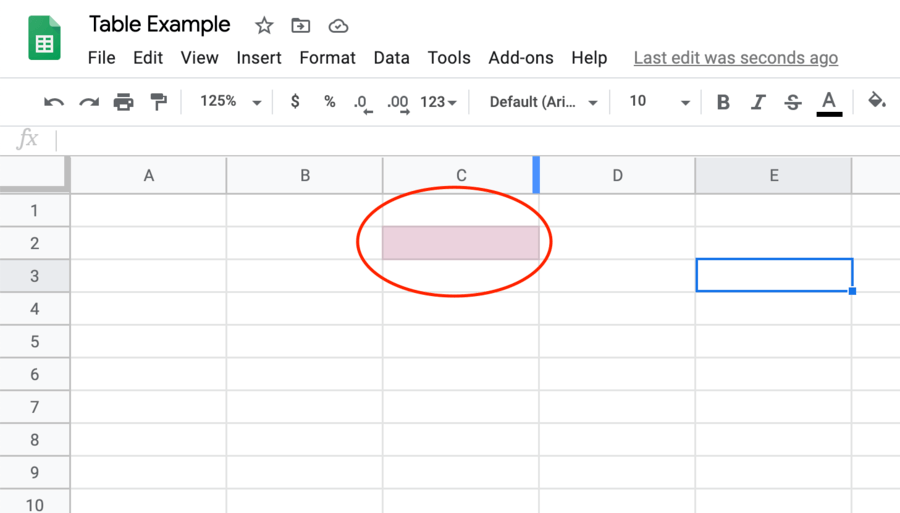
-
0%
Box
-
0%
Cube
-
0%
Rectangle
-
0%
Cell
Q.100.
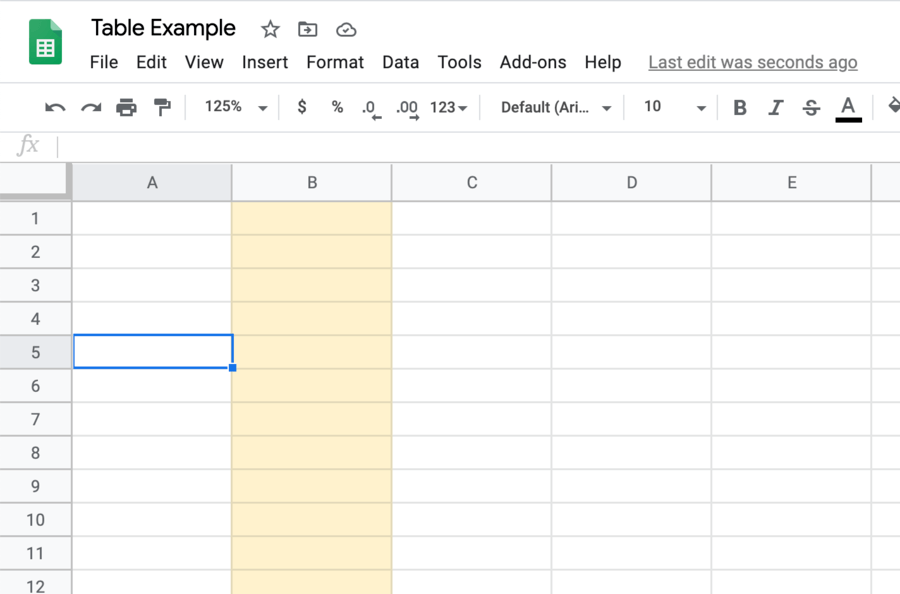
The space highlighted in blue is called a...
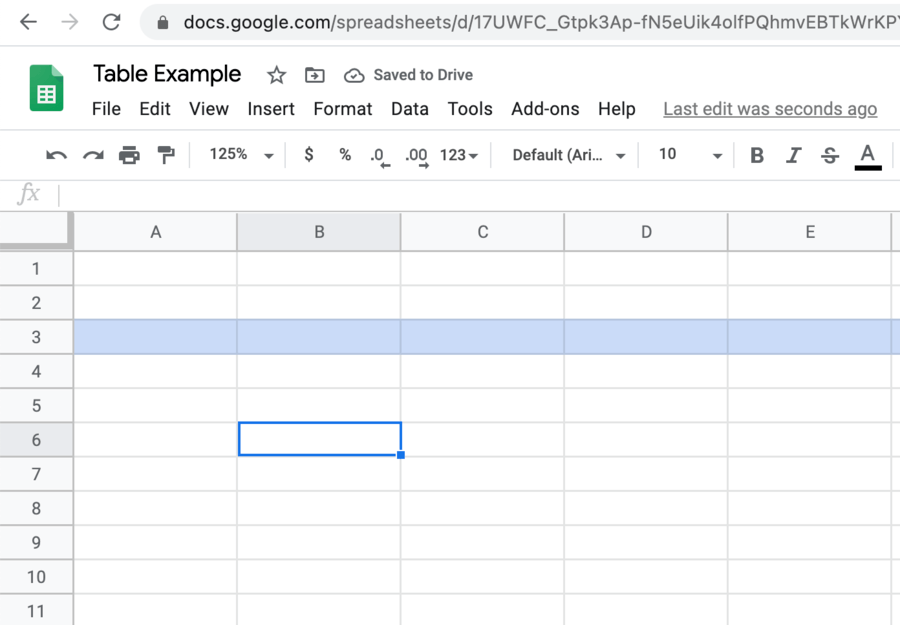
-
0%
Line
-
0%
Horizontal
-
0%
Row
-
0%
Column
Q.101.
The space highlighted in yellow is called a...
-
0%
Row
-
0%
Column
-
0%
Path
-
0%
Line
Q.102.
What is the Cell Reference for the highlighted cell?
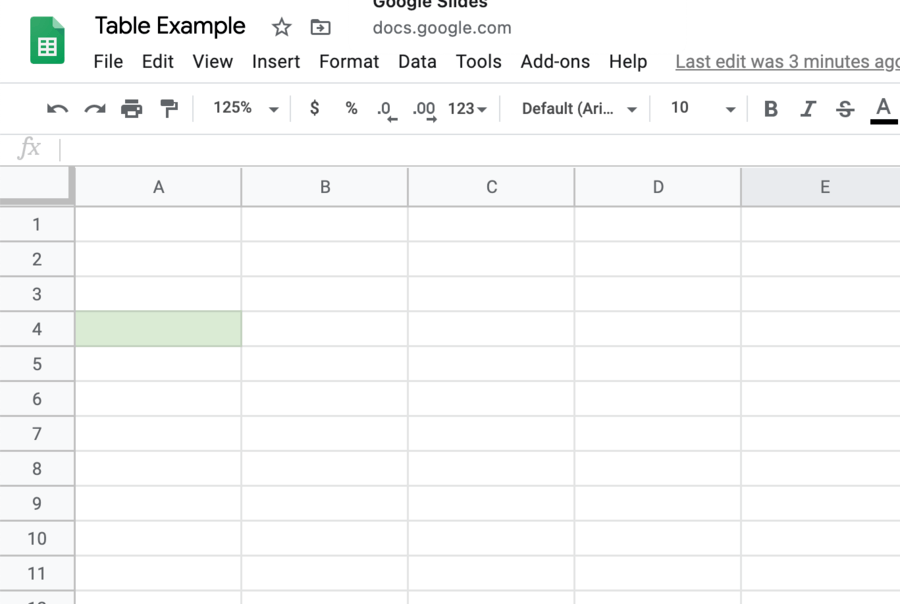
-
0%
B3
-
0%
A4
-
0%
A7
-
0%
C5
Q.103.
What is the Cell Reference for the highlighted cell?
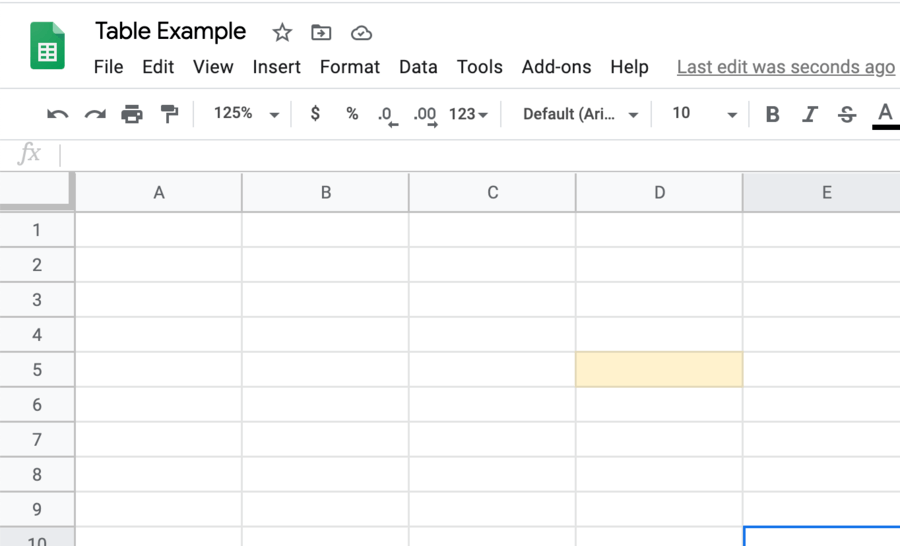
-
0%
D4
-
0%
C5
-
0%
E5
-
0%
D5
Q.104.
Clicking on the button circled in red will allow user to...
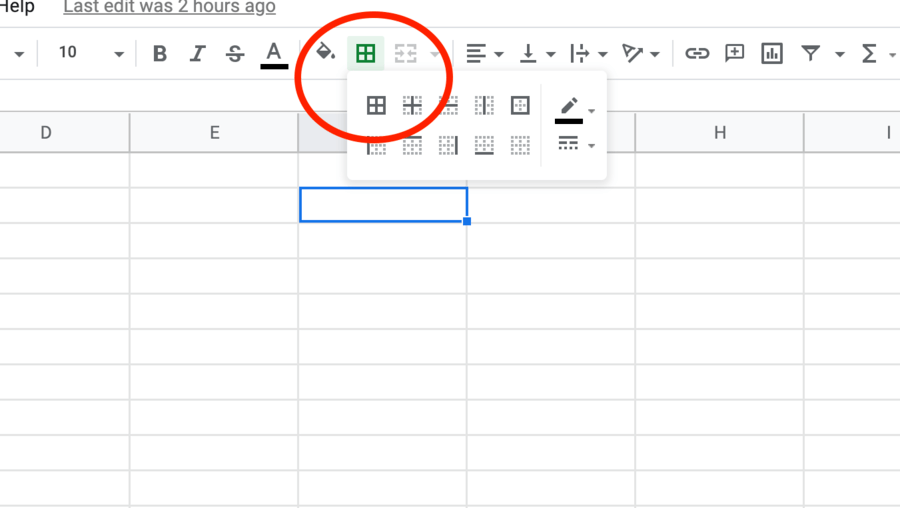
-
0%
Colour the selected cells.
-
0%
Draw borders on the selected cells.
-
0%
Add the numbers in the selected cells.
-
0%
Draw small squares in the selected cells.
Q.105.
When user clicks on the button circled in red, user will be able to...

-
0%
Fill selected cells with colour.
-
0%
Draw borders around selected cells.
-
0%
Fill selected cells with patterns.
-
0%
Fill selected cells with text.
Q.106.
An equation entered into a cell on a spreadsheet is...
-
0%
a Math Problem
-
0%
Someone Else's Problem
-
0%
a Formula
-
0%
a pain in the neck
Q.107.
The place where a column and a row intersect is called a...
-
0%
Row
-
0%
Column
-
0%
Corner
-
0%
Cell
Q.108.
What is an electronic document in which data is arranged in the row and columns of a grid and can be manipulated and used in calculations?
-
0%
Spreadsheet
-
0%
Calendar
-
0%
Tic Tac Toe
-
0%
Graph
Q.109.
A strip of icons used to perform certain functions is...
-
0%
Conjunction Junction (What's your function)
-
0%
a Toolbar
-
0%
the Hollywood Walk of Fame
-
0%
the Ion Icons
Q.110.
This is a group of adjacent (right next to eachother) cells going up and down. This part of a spreadsheet is labeled using a letter.
-
0%
Arch
-
0%
Row
-
0%
Column
-
0%
Pyramid
Q.111.
This is the name for a sheets file. It is made up of one or more worksheets/spreadsheets.
-
0%
Workout
-
0%
Workspace
-
0%
Willy Wonka
-
0%
Workbook
Q.112.
This is a group of adjacent (right next to eachother) cells going left and right. This part of a spreadsheet is labeled using a number.
-
0%
Horizon
-
0%
Row
-
0%
Linear Equation
-
0%
Column
Q.113.
Arranging objects in a certain sequence or order according to specific rules is..
-
0%
Sort/Filter
-
0%
Annoying
-
0%
Search
-
0%
Seek
Q.114.
What is this icon used for?
-
0%
Skyscrapers
-
0%
Arrangemnet
-
0%
Alignment
-
0%
Audio/Video Adjustment
Q.115.
What is this icon used for?

-
0%
Inserting capital a "B"
-
0%
Playing The Bee Movie
-
0%
Being Beautiful
-
0%
Making selected text Bold
Q.116.
What is this icon used for?

-
0%
Adjusting the Border Style of Selected Cells
-
0%
Connect Four
-
0%
4 Square
-
0%
Rubic's Cube
Q.117.
What is this icon used for?

-
0%
Putting lines through all your "S's"
-
0%
Getting rich quickly
-
0%
Sizzling snakes swiftly
-
0%
Changing the content of a cell to a certain kind of money
Q.118.
What is this icon used for?

-
0%
Moving your zeros
-
0%
Changing direction
-
0%
Adding or taking away decimal places
-
0%
Adding 10ths and 100ths
Q.119.
What is this picture?

-
0%
A bunch of buttons.
-
0%
Google Sheets Toolbar
-
0%
A long rectangle with things on it.
-
0%
The secret code to Mr. P's lunchbox
Q.120.
What do these buttons do?

-
0%
Back space and move forward
-
0%
Look back before moving forward
-
0%
Undo or Redo
-
0%
Get Out the Way
Q.121.
What does this button do?

-
0%
Makes you lean forward to read text
-
0%
Put selected text into Itallics
-
0%
Type a bunch of slanted I's
-
0%
Blow your text over with hurricane force winds
Q.122.
This button is used to...

-
0%
merge cells together into on larger cell.
-
0%
move rectangles to the middle.
-
0%
point things together.
-
0%
put some arrows in boxes.
Q.123.
If you click this button you will ...

-
0%
add to 6.
-
0%
start a race.
-
0%
count to 3.
-
0%
be able to change the format of a number (or way the number is listed).
Q.124.
Clicking this button will...

-
0%
put a couple zeros on your numbers.
-
0%
slash your prices.
-
0%
convert your number into a percent.
-
0%
divide your zeros in half.
Q.125.
A combination of a letter and a number that specifies the column and row in which a cell is located.
-
0%
Cell Name
-
0%
Cell Address
-
0%
Home Address
-
0%
Bingo
Q.126.
The sort/ filter button arranges data in a particular order.
-
0%
True
-
0%
False
Q.127.
What is the name of this button?

-
0%
Formula
-
0%
Function
-
0%
Cell Address
-
0%
Sort/ Filter
Q.128.
What is the name of this button?

-
0%
the "M" button
-
0%
the backwards 3 button
-
0%
Function button
-
0%
the math button
Q.129.
This button will

-
0%
underline your words
-
0%
strike through your words
-
0%
Make your letters look shadowed
-
0%
Make your letters smaller
Q.130.
When you have a combination of more than one worksheet it creates a workbook.
-
0%
True
-
0%
False
Q.131.
All formulas in Google Sheets begin with the following symbol:
-
0%
+
-
0%
-
-
0%
=
-
0%
%
Q.132.
Select ______________ from the functions drop-down menu to add a set of numbers together.
-
0%
average
-
0%
count
-
0%
max
-
0%
sum
Q.133.
Select ___________________ from the functions menu to find the smallest value in a group.
-
0%
max
-
0%
min
-
0%
sum
-
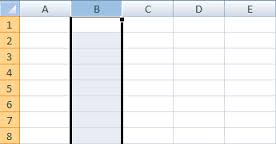
0%
average
Q.134.
What is the name of a vertical section of a spreadsheet as selected in the image?
-
0%
row
-
0%
cell
-
0%
column
-
0%
format
Q.135.
What is the name of this cell?
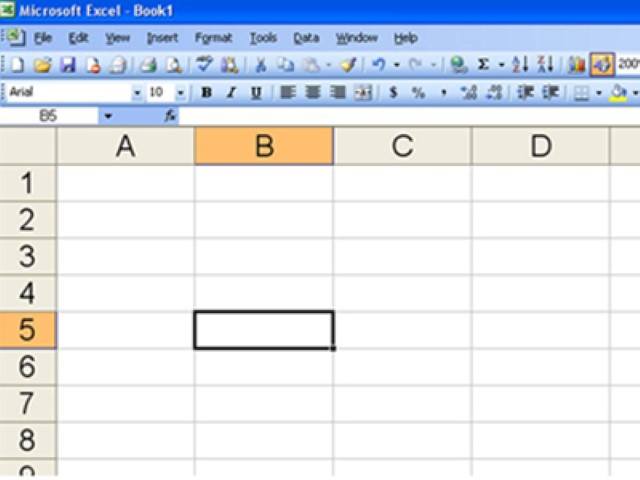
-
0%
B10
-
0%
5B
-
0%
B5
-
0%
you cannot know the name from this picture
Q.136.
If I want to make a cell a particular color, which button would I click on?
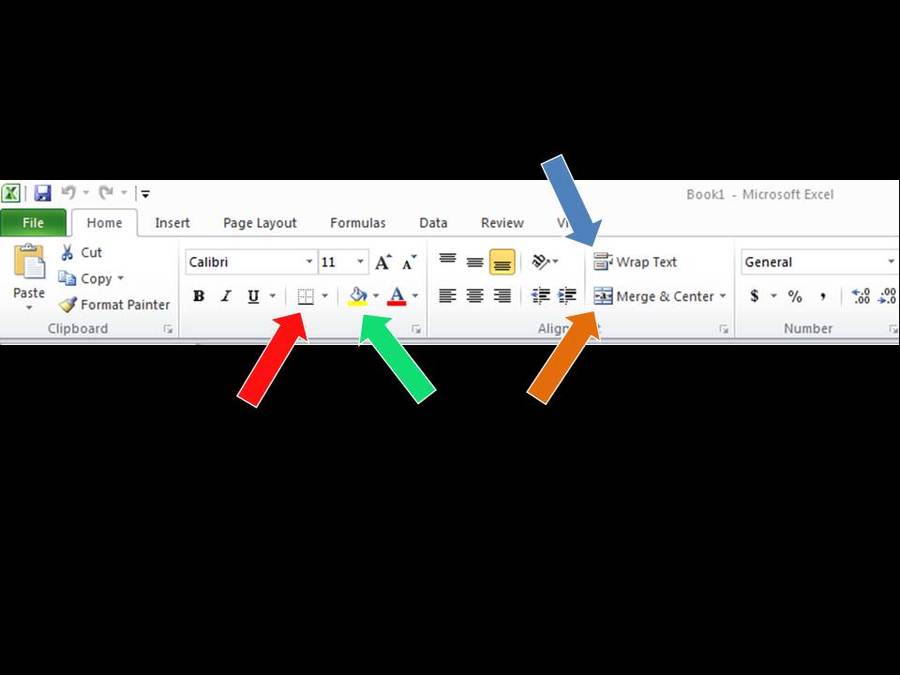
-
0%
orange arrow
-
0%
red arrow
-
0%
blue arrow
-
0%
green arrow
Q.137.
SUM, AVERAGE, MAX and MIN are preset formulas on the _______________ menu.
-
0%
filter
-
0%
functions
-
0%
border
-
0%
fill color
Q.138.
To select only a few random cells, hold down the _______ key.
-
0%
Tab
-
0%
Option
-
0%
Shift
-
0%
Command
Q.139.
To select a block of cells, hold down the ________ key or drag.
-
0%
Shift
-
0%
Command
-
0%
Option
-
0%
Delete
Q.140.
B1 is a?
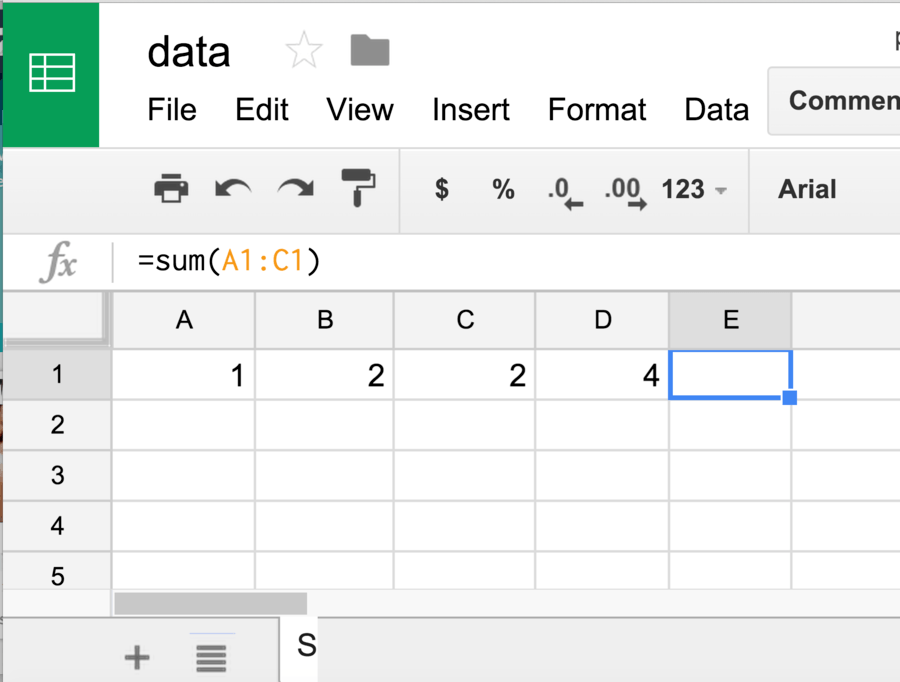
-
0%
row
-
0%
column
-
0%
cell
-
0%
sheet
Q.141.
What number is in D1?
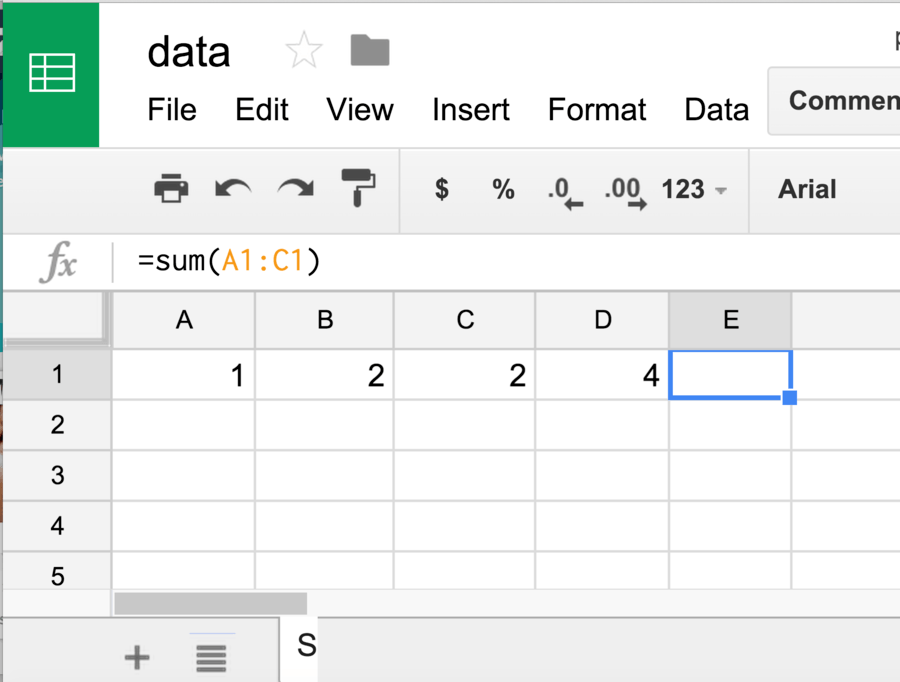
-
0%
1
-
0%
2
-
0%
blank
-
0%
4
Q.142.
What is the name of a vertical section of a spreadsheet as selected in the image?
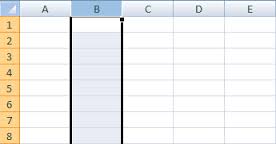
-
0%
row
-
0%
cell
-
0%
column
-
0%
format
Q.143.
What is the name of this cell?
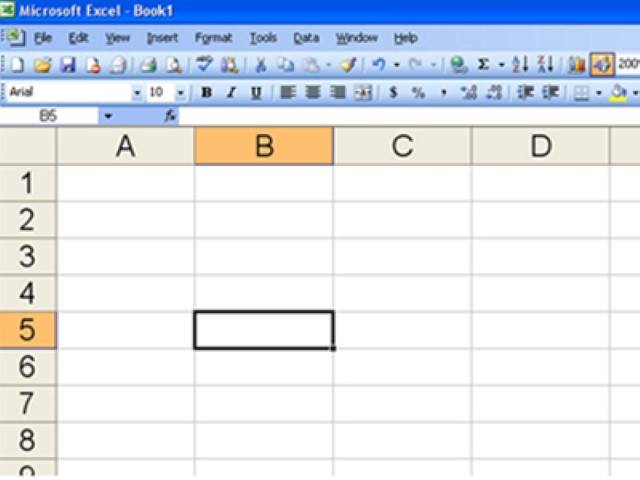
-
0%
B10
-
0%
5B
-
0%
B5
-
0%
you cannot know the name from this picture
Q.144.
What is the name of this button?

-
0%
Function button
-
0%
the backwards 3 button
Q.145.
What do these buttons do?

-
0%
Back space and move forward
-
0%
Look back before moving forward
-
0%
Undo or Redo
-
0%
Get Out the Way
Q.146.
What is it called when you hold your mouse button down to select a group of cells?
-
0%
fill down
-
0%
fill right
-
0%
drag
-
0%
row
Q.147.
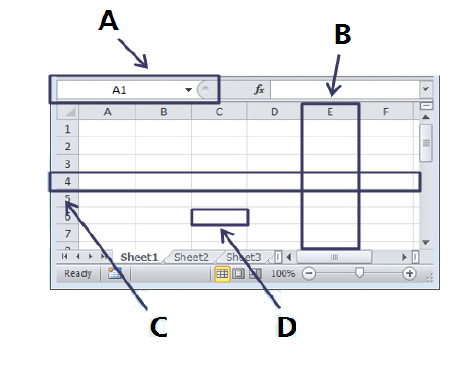
Which letter on the image is a Column?
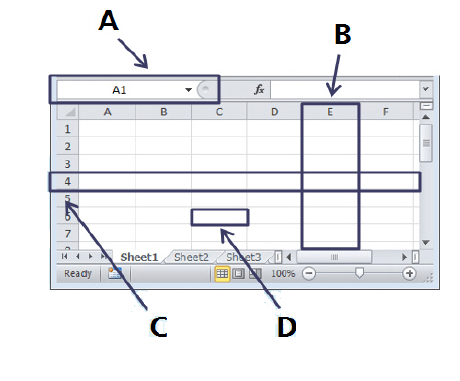
-
0%
A
-
0%
B
-
0%
C
-
0%
D
Q.148.
Which letter on the image is a Row?
-
0%
A
-
0%
B
-
0%
C
-
0%
D
Q.149.
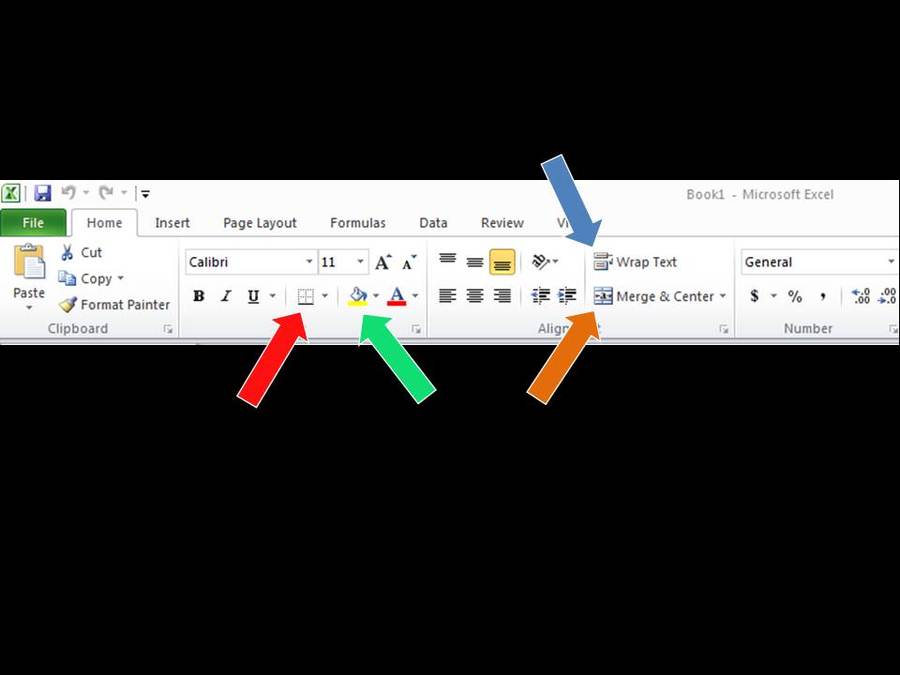
If I want to make a cell a particular color, which button would I click on?
-
0%
orange arrow
-
0%
red arrow
-
0%
blue arrow
-
0%
green arrow
Q.150.
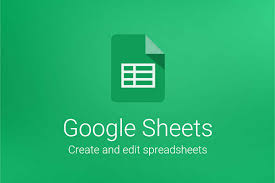
Google Sheets is used to?
-
0%
Add numbers.
-
0%
Make charts (graphs).
-
0%
Put information in columns and rows.
-
0%
All of the above.
Q.151.
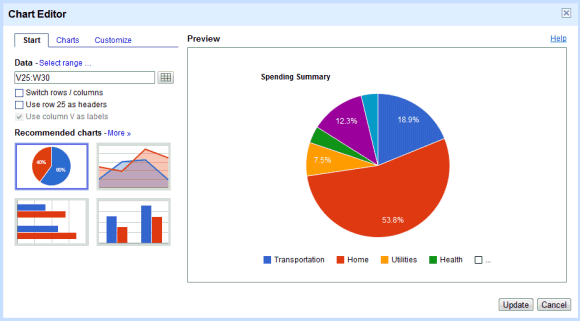
If I want to add a Chart, one way is to select the ____________ tab.
-
0%
Home
-
0%
Insert
-
0%
Page Layout
-
0%
Data
Q.152.
An electronic document in which data is arranged in the rows and columns and can uses calculations.
-
0%
Spreadsheet
-
0%
Cell Address
-
0%
Function
-
0%
Sum
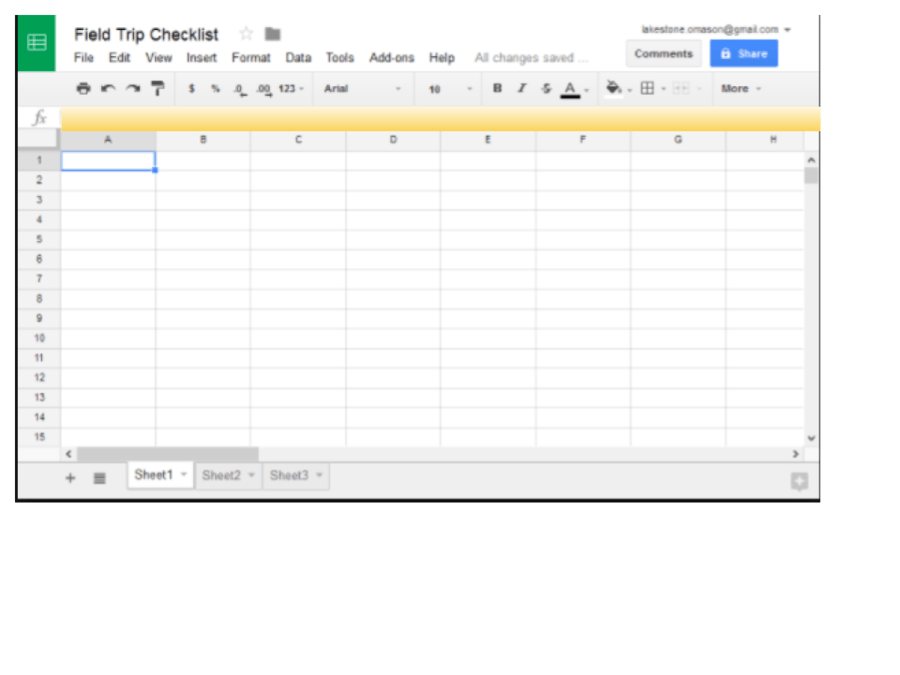
Q.153.
What is the name of the yellow highlighted area?
-
0%
Task bar
-
0%
Formula bar
-
0%
Tool bar
-
0%
Functions
Q.154.
What is the name of this cell?
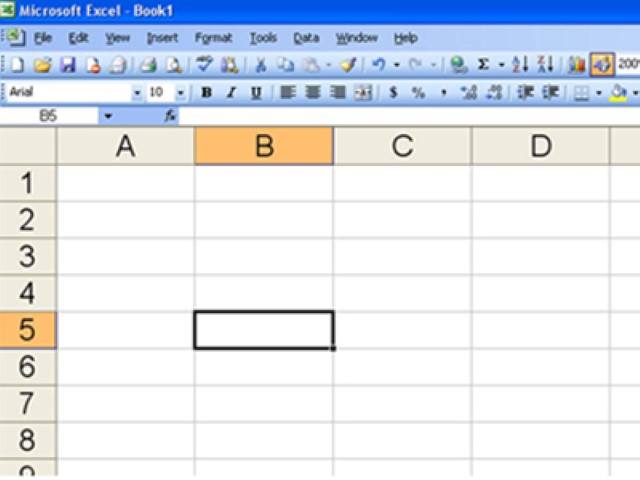
-
0%
B10
-
0%
5B
-
0%
B5
-
0%
you cannot know the name from this picture
Q.155.
What is a vertical section of a spreadsheet?
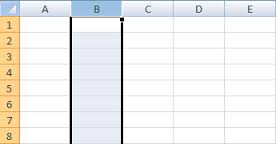
-
0%
row
-
0%
cell
-
0%
column
-
0%
format
Q.156.
What is the name of the yellow highlighted area?
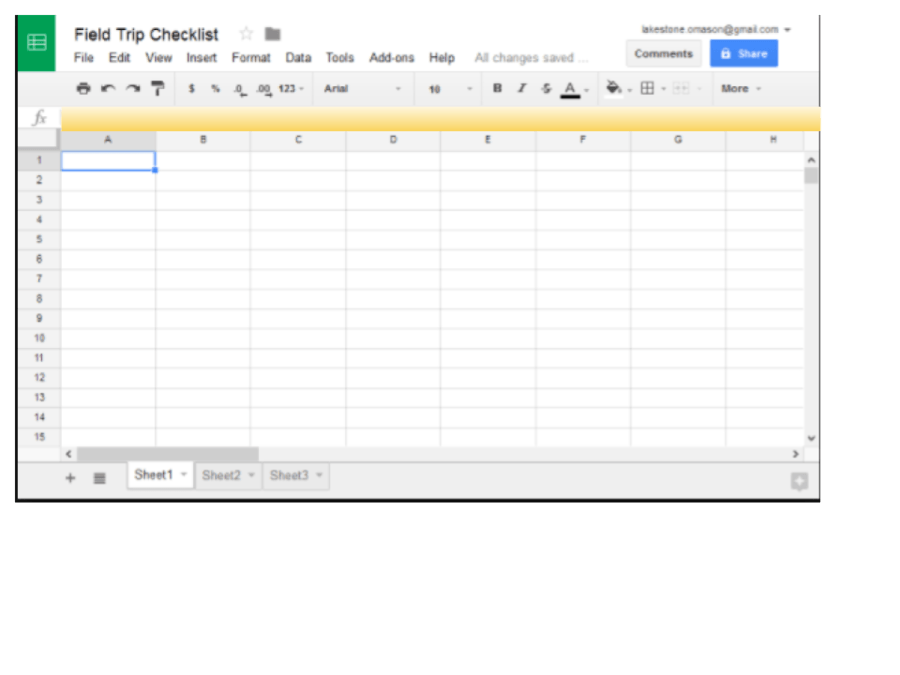
-
0%
Task bar
-
0%
Formula bar
-
0%
Tool bar
-
0%
Functions
Q.157.
What number is in D1?
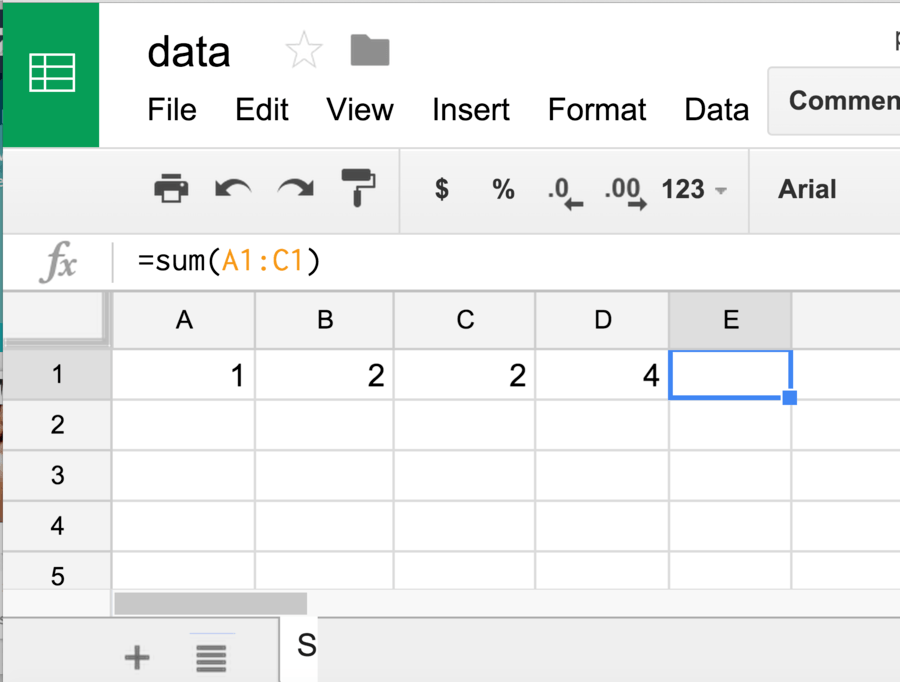
-
0%
1
-
0%
2
-
100%
blank
-
0%
4
Q.158.
What is the name of this cell?
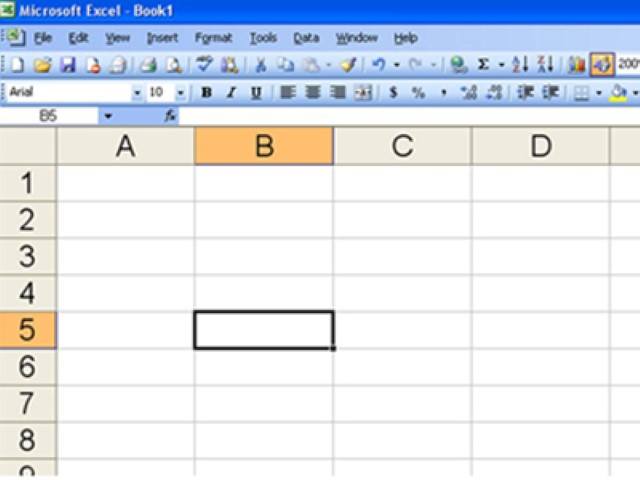
-
0%
B10
-
0%
5B
-
100%
B5
-
0%
you cannot know the name from this picture
Q.159.
In a Google Spreadsheet, you can widen an entire column anywhere in the sheet.
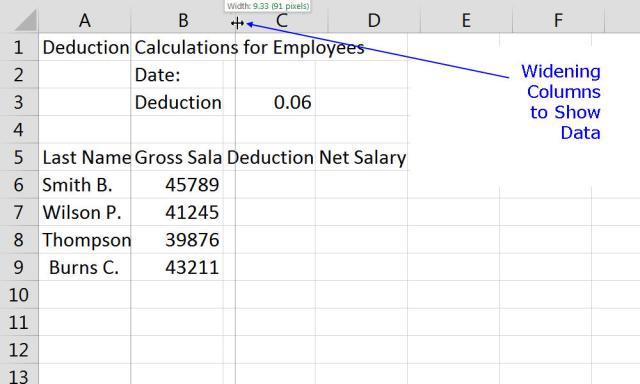
-
100%
True
-
0%
False
Q.160.
True/False: Every row and column of a new spreadsheet is always set to the same height and width.
-
0%
True
-
100%
False
Q.161.
You can set a column's width to fit its content automatically using the ______________ feature.
-
100%
Double Arrow
-
0%
Autosize
-
0%
Drop-Down
Q.162.
To organize your spreadsheet and make it easier to navigate, you can create,__________, delete, move, and duplicate sheets.
-
0%
clear
-
100%
function
-
0%
rename
-
0%
autosize
Q.163.
What is the name of this cell?
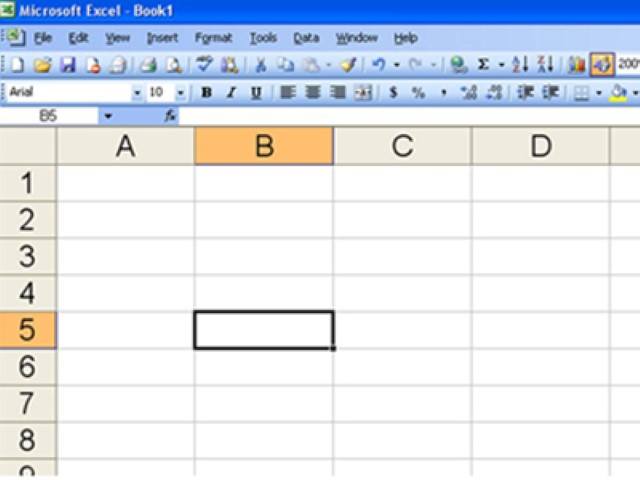
-
0%
B10
-
0%
5B
-
100%
B5
-
0%
you cannot know the name from this picture
Q.164.
In a Google Spreadsheet, you can widen an entire column anywhere in the sheet.
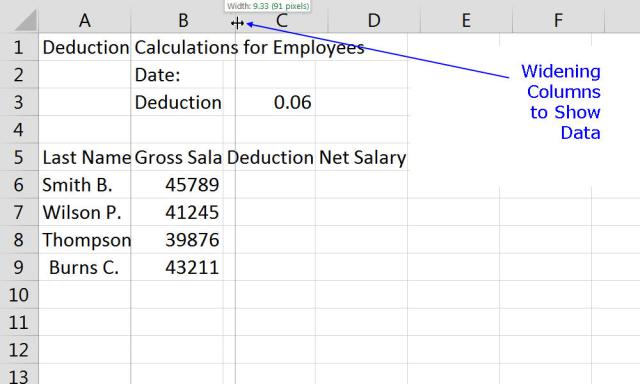
-
0%
True
-
100%
False
Q.165.
B1 is a?
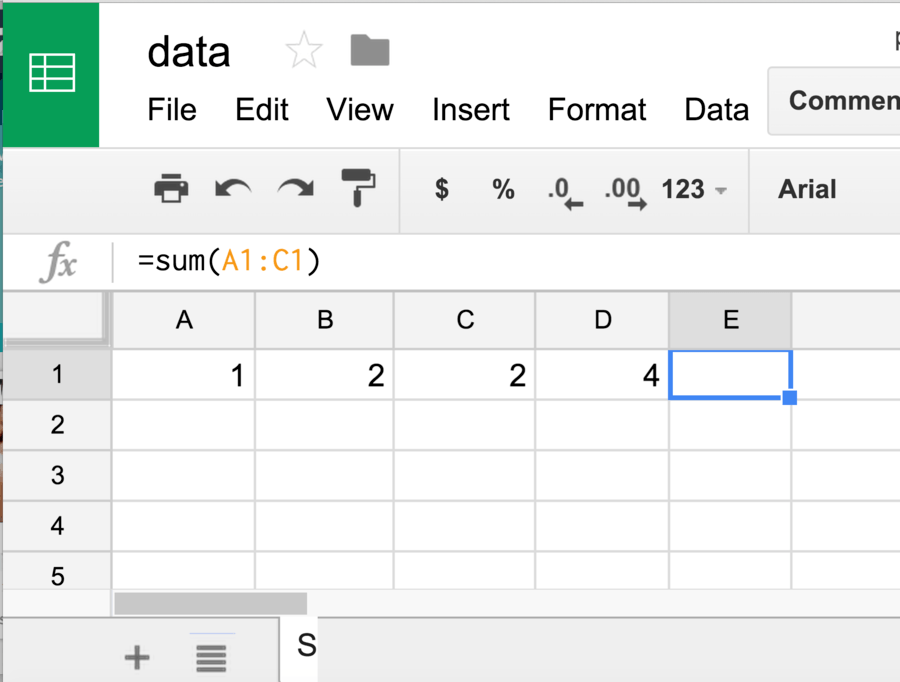
-
0%
row address
-
0%
column address
-
0%
cell address
-
0%
sheet address
Q.166.
What is the name of a vertical section of a spreadsheet as selected in the image?
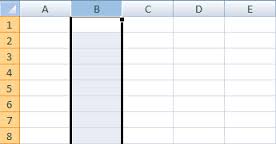
-
0%
row
-
0%
cell
-
100%
column
-
0%
format
Q.167.
What is the name of this cell?
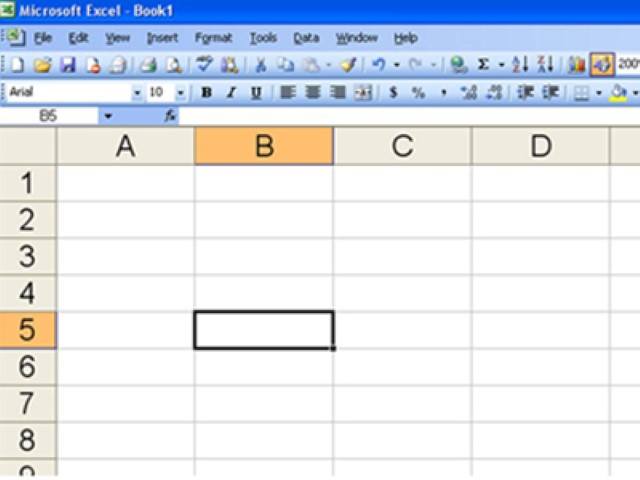
-
0%
B10
-
0%
5B
-
100%
B5
-
0%
B6
Q.168.
What number is in D1?
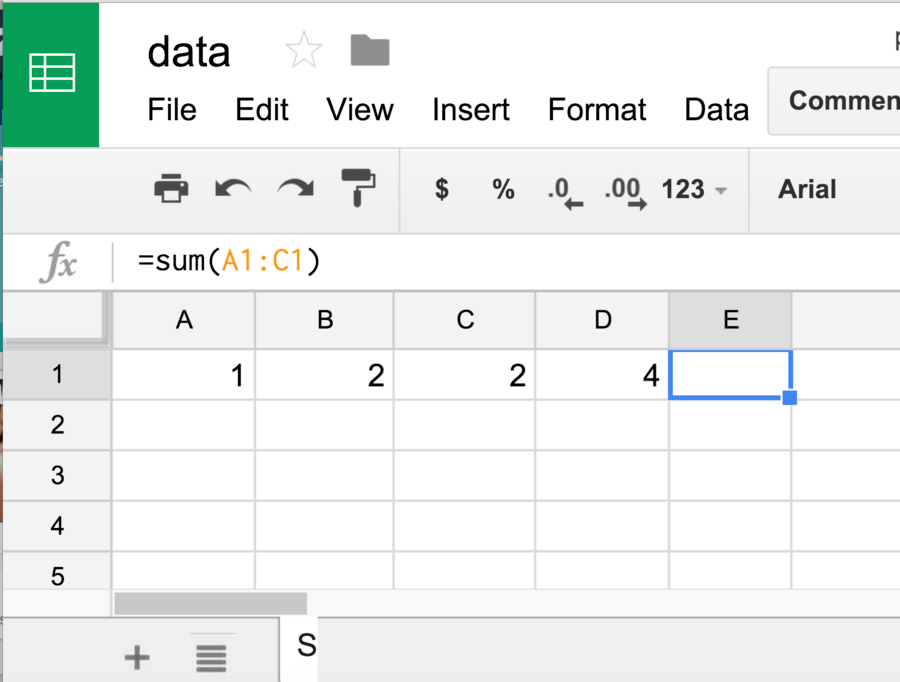
-
0%
1
-
0%
2
-
0%
blank
-
100%
4
Q.169.
The correct formula to add cell B1 and B2 is
-
0%
AddB1+C1
-
100%
=sum(B1+C1)
-
0%
=B1+B2
-
0%
=sum(B1-B2)
Q.170.
Google Sheets is a program that allows a user to _____.
-
0%
create electronic slide shows
-
0%
browse sites on the internet
-
0%
write letters
-
100%
calculate numerical information
Q.171.
In Google Sheets, the _____ function adds all the numbers in a range and then divides the total by the total number of values.
-
0%
SUM
-
100%
AVERAGE
-
0%
COUNT
-
0%
MIN
Q.172.
What do these buttons do?

-
0%
Back space and move forward
-
0%
Look back before moving forward
-
100%
Undo or Redo
-
0%
Get Out the Way
Q.173.
Google Sheets is not similar to Microsoft Excel
-
100%
True
-
0%
False
Q.174.
Google Sheets are used to carry out lots of calculations quickly (formulas)
-
100%
True
-
0%
False
Q.175.
What is the name of a horizontal section of a spreadsheet as selected in the image?
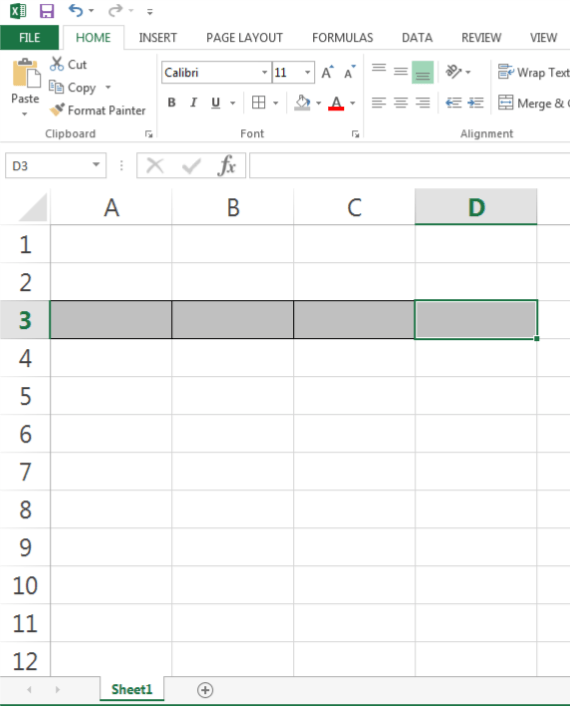
-
100%
row
-
0%
cell
-
0%
column
-
0%
format
Q.176.
Begins a list with the lowest number or the first letter in the alphabet (A---Z).
-
0%
Ascending
-
0%
Descending
-
0%
Auto-fill
-
0%
Sort Filling
Q.177.
Feature allows the user to copy data to adjacent cells by selecting the cell, then dragging the auto-fill handle over cells to be filled with the copied content.
-
0%
Ascending
-
0%
Descending
-
0%
Auto-fill
-
0%
Sort Filling
Q.178.
What is the name of this cell?
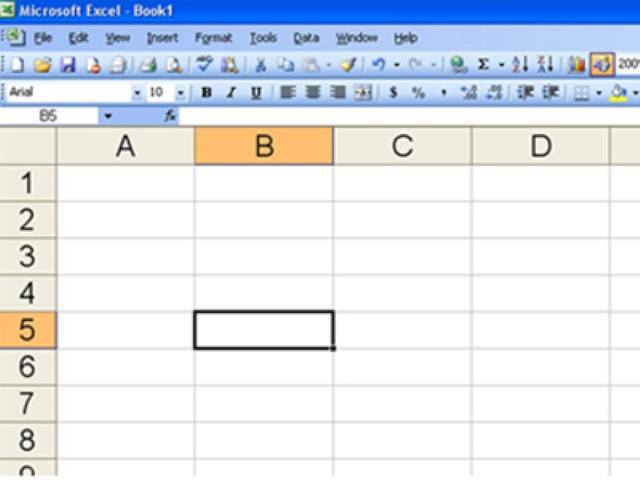
-
0%
B10
-
0%
5B
-
0%
B5
-
0%
you cannot know the name from this picture
Q.179.
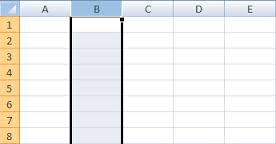
What is a vertical section of a spreadsheet?
-
0%
row
-
0%
cell
-
0%
column
-
0%
format
Q.180.
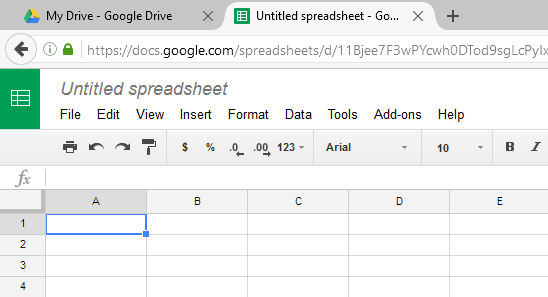
In Google Sheets, rows are identified by
-
0%
Letters
-
0%
Numbers
Q.181.
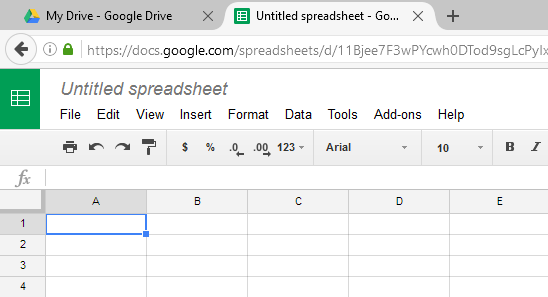
In Google Sheets, columns are identified by
-
0%
Letters
-
0%
Numbers
Q.182.
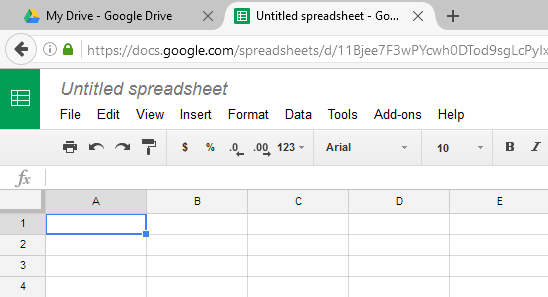
In a spreadsheet, what is the small box where a row and column meet called?
-
0%
Compartment
-
0%
File
-
0%
Cell
-
0%
Formula
Q.183.
I forgot to add a column. Which menu should I use?
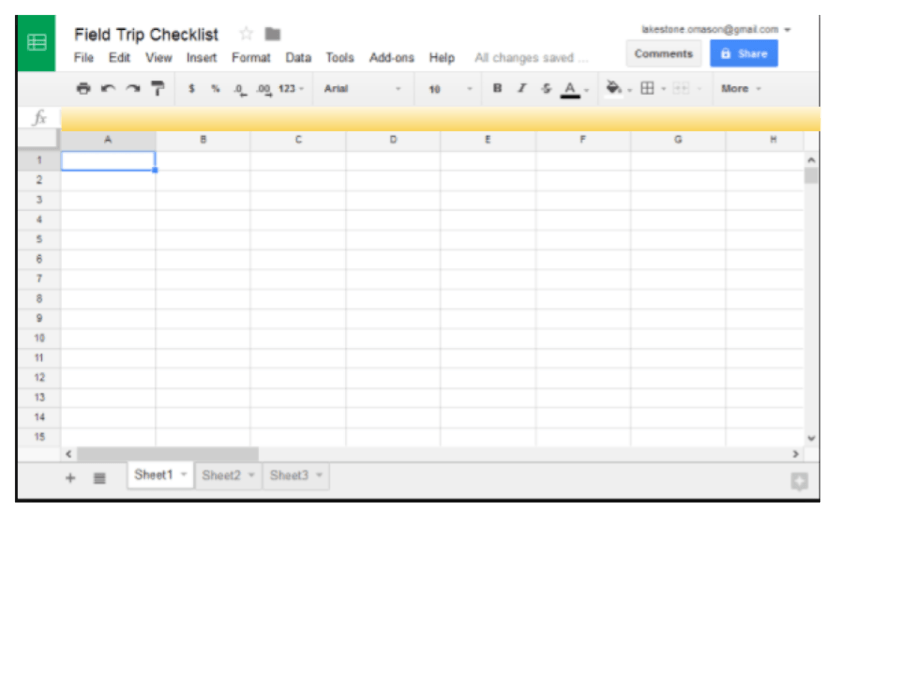
-
0%
File
-
0%
Edit
-
0%
Format
-
0%
Insert
Q.184.
B1 is a?
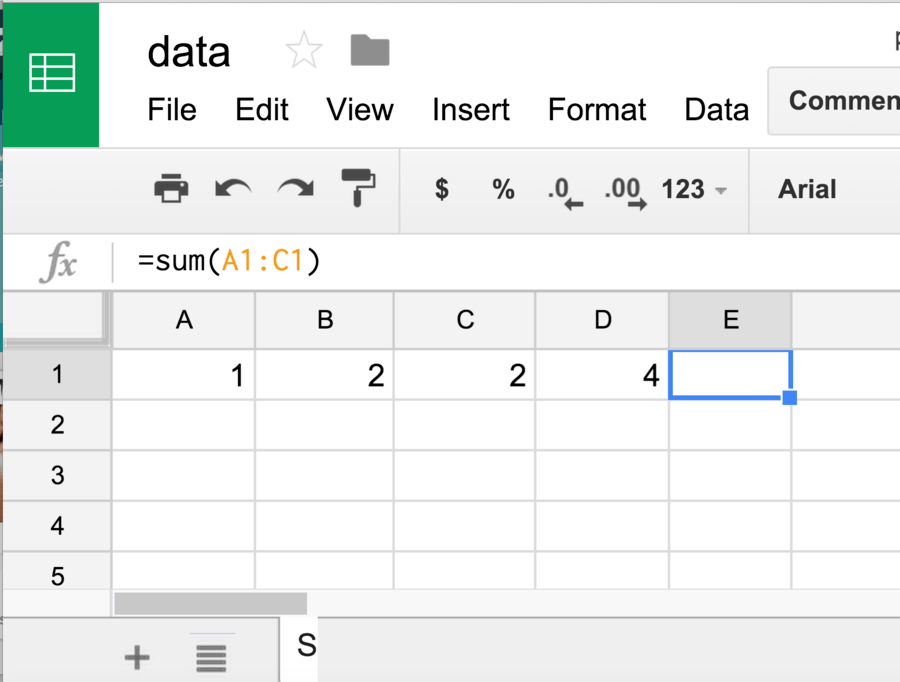
-
0%
row
-
0%
column
-
0%
cell
-
0%
sheet
Q.185.
What number is in D1?
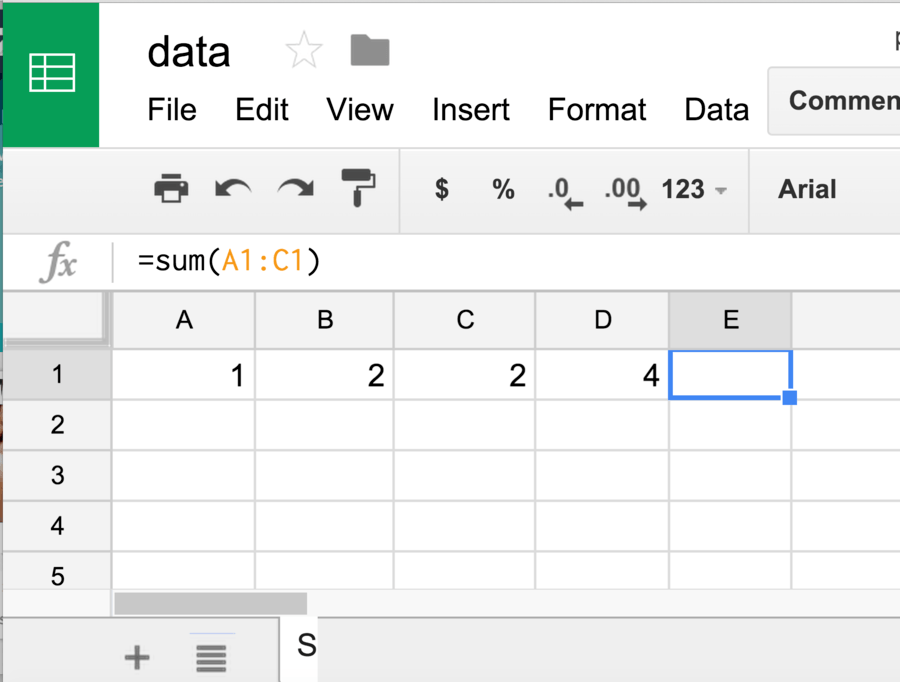
-
0%
1
-
0%
2
-
0%
blank
-
0%
4
Q.186.
Which letter on the image is a Column?
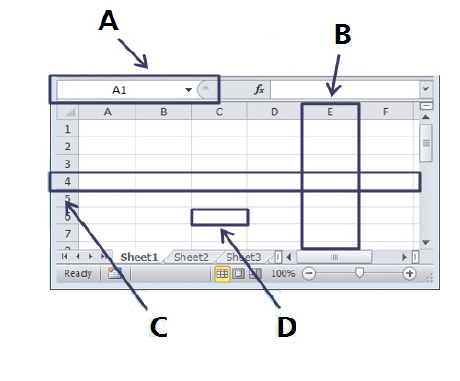
-
0%
A
-
0%
B
-
0%
C
-
0%
D
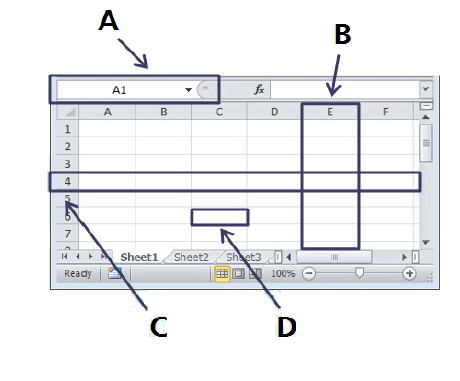
Q.187.
Which letter on the image is a Row?
-
0%
A
-
0%
B
-
0%
C
-
0%
D
Q.188.
If I want to make a cell a particular color, which button would I click on?
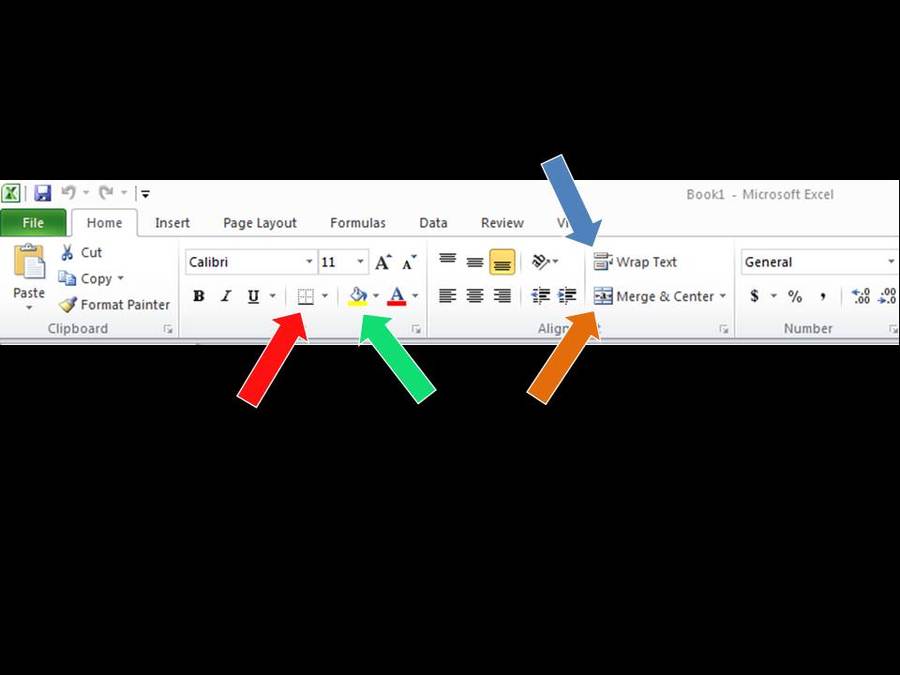
-
0%
orange arrow
-
0%
red arrow
-
0%
blue arrow
-
0%
green arrow
Q.189.
Google Sheets is used to?
-
0%
Add numbers.
-
0%
Make charts (graphs).
-
0%
Put information in columns and rows.
-
0%
All of the above.
Q.190.
Double-clicking between two columns will ____________ the column.

-
0%
delete
-
0%
copy
-
0%
resize
-
0%
fill
Q.191.
Why would you want to change the column width?
-
0%
to make sure the title is visible
-
0%
to make sure headings are always visible
-
0%
to make sure all of the numbers are visible
-
0%
All of the Above
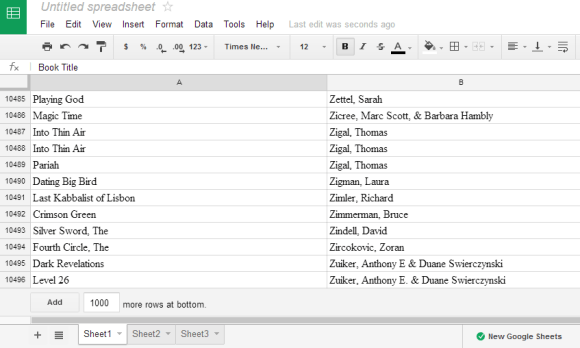
Q.192.
If I want to make a cell a particular color, which button would I click on?
-
0%
Format tab
-
0%
Font style
-
0%
Text color
-
0%
Fill color
Q.193.
Identify this cell (highlighted)
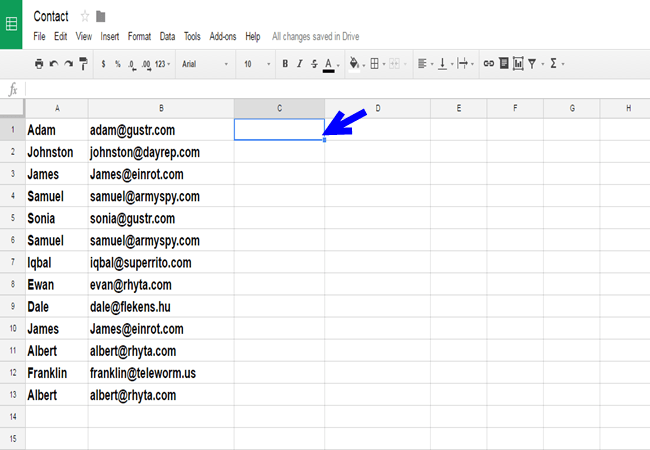
-
0%
A3
-
0%
C3
-
100%
C1
-
0%
C U L8R
Q.194.
An Sheets document is called a?

-
0%
Work page
-
0%
Work paper
-
0%
Slide
-
100%
Spreadsheet
Q.195.
To fill a cellwith color using the paint bucket tool
-
0%
Fill
-
0%
Fill Handle
-
0%
Filter
-
100%
Formula
Q.196.
The dot at the bottom of each cell while it is active
-
0%
Fill
-
0%
Fill Handle
-
0%
Filter
-
0%
Formula
Q.197.
The horizontal and vertical lines on the spreadsheet
-
0%
Graph
-
0%
Grid Lines
-
0%
Row
-
100%
Selecting
Q.198.
One page of a spreadsheet
-
0%
Sheet Tabs
-
0%
Spreadsheets
-
0%
Value
-
0%
Workbook
-
100%
Worksheet
Q.199.
What is this icon used for?

-
0%
Skyscrapers
-
0%
Arrangemnet
-
100%
Alignment
-
0%
Audio/Video Adjustment
Q.200.
What is this icon used for?

-
0%
Inserting capital a "B"
-
0%
Playing The Bee Movie
-
0%
Being Beautiful
-
100%
Making selected text Bold
Q.201.
What is this icon used for?

-
0%
Adjusting the Border Style of Selected Cells
-
100%
Connect Four
-
0%
4 Square
-
0%
Rubic's Cube
Q.202.
This button is used to...

-
100%
merge cells together into on larger cell.
-
0%
move rectangles to the middle.
-
0%
point things together.
-
0%
put some arrows in boxes.
Q.203.
Google Sheets ไม่สามารถสร้างชิ้นงานอะไรได้
-
0%
ตาราง
-
0%
กรอกข้อมูล
-
100%
คำนวณ
-
0%
วาดรูป
Q.204.
โปรแกรมในรูปเหมาะสำหรับงานลักษณะใด
-
0%
Google docs
-
100%
พิมพ์เอกสารออนไลน์ Google sheet
-
0%
สร้างตารางคำนวณ Google Driver
-
0%
สร้างงานนำเสนอออนเไลน์
Q.205.
จากรูป คือข้อใด
-
0%
Google Drive
-
0%
Google Site
-
100%
Google Sheets
-
0%
Google Slide