Q.1.
What is the shortcut for "PASTE" option?
-
100%
CTRL+V
-
0%
CTRL+A
-
0%
CTRL+B
-
0%
CTRL+C
Q.2.
What is the shortcut for "PRINT" option?
-
0%
CTRL+M
-
0%
CTRL+O
-
0%
CTRL+N
-
100%
CTRL+P
Q.3.
What is the shortcut for "SELECTING ALL"?
-
100%
CTRL+A
-
0%
CTRL+Z
-
0%
CTRL+Y
-
0%
CTRL+F
Q.4.
What is the shortcut for "SAVE" option?
-
0%
CTRL+X
-
100%
CTRL+S
-
0%
CTRL+Z
-
0%
CTRL+C
Q.5.
What is the shortcut for "UNDO" option?
-
0%
CTRL+B
-
100%
CTRL+O
-
0%
CTRL+N
-
0%
CTRL+Z
Q.6.
What is the shortcut for opening a "NEW" file?
-
0%
CTRL+B
-
0%
CTRL+O
-
100%
CTRL+N
-
0%
CTRL+Z
Q.7.
What is the shortcut for "REDO" option?
-
0%
CTRL+I
-
0%
CTRL+M
-
0%
CTRL+N
-
100%
CTRL+Y
Q.8.
What is the shortcut for "MOVING a text or an object" option?
-
100%
CTRL+B
-
0%
CTRL+C
-
0%
CTRL+N
-
0%
CTRL+X
Q.9.
What is the shortcut for adding a "NEW SLIDE" in PowerPoint?
-
100%
CTRL+M
-
0%
CTRL+B
-
0%
CTRL+N
-
0%
CTRL+C
Q.10.
What is the shortcut for making the text "BOLD"?
-
0%
CTRL+X
-
0%
CTRL+W
-
100%
CTRL+B
-
0%
CTRL+C
Q.11.
What is the shortcut for "COPYING" option?
-
0%
CTRL+X
-
0%
CTRL+A
-
0%
CTRL+O
-
100%
CTRL+C
Q.12.
What is the shortcut for making the text "ITALIC" option?
-
0%
CTRL+X
-
0%
CTRL+A
-
0%
CTRL+O
-
100%
CTRL+I
Q.13.
What is the shortcut for "Underline" option?
-
0%
Ctrl+ A
-
0%
Ctrl +M
-
0%
Ctrl+ N
-
100%
Ctrl+ U
Q.14.
What is the shortcut for "find" option?
-
100%
Ctrl+ F
-
0%
Ctrl +M
-
0%
Ctrl+ W
-
0%
Ctrl+ U
Q.15.
Bold
-
0%
Ctrl + I
-
0%
Ctrl + U
-
0%
Shift + B
-
100%
Ctrl +B
Q.16.
Underline
-
0%
Ctrl + I
-
100%
Ctrl + U
-
0%
Ctrl + B
-
0%
Alt + U
Q.17.
Ctrl + I
-
0%
Underline
-
0%
Bold
-
0%
Left-align
-
100%
Italics
Q.18.
Copy
-
100%
Ctrl + C
-
0%
Ctrl + V
-
0%
Ctrl + X
-
0%
Ctrl + B
Q.19.

-
0%
Ctrl + P
-
0%
Ctrl + S
-
100%
Ctrl + N
-
0%
F4
Q.20.

-
0%
Ctrl + V
-
100%
Ctrl + S
-
0%
Shift + K
-
0%
Ctrl + P
Q.21.

-
0%
F8
-
0%
Ctrl + P
-
0%
F7
-
0%
Ctrl + C
Q.22.
All are text-align shortcuts, except...
-
0%
Ctrl + I
-
0%
Ctrl + E
-
0%
Ctrl + L
-
100%
Ctrl + R
Q.23.

-
0%
Ctrl + J
-
0%
Ctrl + R
-
0%
Ctrl + E
-
0%
Ctrl + L
Q.24.
Ctrl + Z
-
100%
Undo
-
0%
Delete
-
0%
Redo
-
0%
Zip Drive
Q.25.
Ctrl + 2
-
0%
Single spacing
-
0%
Increase font size
-
100%
Double spacing
-
0%
Number lock
Q.26.
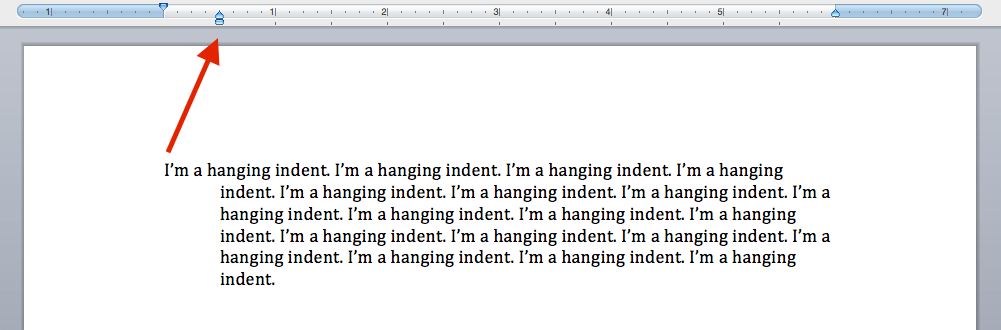
-
0%
Ctrl + J
-
0%
Ctrl + T
-
0%
Ctrl + H
-
0%
Ctrl + 2
Q.27.
Ctrl + A
-
0%
Selects all text
-
0%
Adds numbers
-
0%
Order alphabetically
-
0%
Annotate
Q.28.
The end of this quiz...or close a document
-
0%
Ctrl + C
-
0%
Ctrl + End
-
100%
Ctrl + S
-
0%
Ctrl + W
Q.29.
To Paste the text, which option to select in Home Tab
-
0%
Copy
-
0%
Paste
-
100%
Cut
Q.30.
Undo
-
0%
Ctrl + x
-
100%
Ctrl + z
-
0%
Ctrl + u
-
0%
Ctrl + n
Q.31.
To Cut the selected text which option to Select from Home Tab
-
0%
Copy
-
0%
Cut
-
0%
Paste
Q.32.
Print
-
100%
Ctrl + p
-
0%
Alt + p
-
0%
Ctrl + t
-
0%
Ctrl + pr
Q.33.
Save
-
0%
Ctrl + t
-
0%
Ctrl + d
-
0%
Ctrl + g
-
100%
Ctrl + s
Q.34.
Open File
-
0%
Ctrl + o
-
0%
Ctrl + of
-
0%
Ctrl + f
-
0%
Ctrl + l
Q.35.
Shortcut key for selecting a word to the right of the cursor
-
0%
Shift + A
-
0%
Shift + ->
-
0%
Shift + <-
-
0%
Ctrl + A
Q.36.
Copying a text creates a copy or duplicate of selected text without changing the original text.
-
0%
True
-
0%
False
Q.37.
To exit Word Application
-
0%
Alt + F4
-
0%
Ctrl + P
-
0%
Ctrl + A
-
0%
Shift + UP
Q.38.
Once a document is created you cannot add any text in it
-
0%
True
-
0%
False
Q.39.
To Select a Word
-
0%
Double Click
-
0%
Triple Click
-
0%
CTRL+S
-
0%
CTRL+W
Q.40.
Ctrl + C
-
0%
CUT
-
0%
COPY
-
0%
PASTE
-
0%
UNDO
Q.41.
Ctrl + V
-
0%
CUT
-
0%
COPY
-
0%
PASTE
-
0%
UNDO
Q.42.
Alt + Tab
-
0%
Switch between open items
-
0%
Search for file/folder
-
0%
Lock Screen (Chromebook)
-
0%
Logout (Chromebook)
Q.43.
F3 (PC)
-
0%
Switch between open items
-
0%
Search for file/folder
-
0%
Lock Screen (Chromebook)
-
0%
Logout (Chromebook)
Q.44.
Search + L (Chromebook)
-
0%
Switch between open items
-
0%
Search for file/folder
-
0%
Lock Screen (Chromebook)
-
0%
Logout (Chromebook)
Q.45.
Ctrl + Shift + Q+Q (Chromebook)
-
0%
Switch between open items
-
0%
Search for file/folder
-
0%
Lock Screen (Chromebook)
-
0%
Logout (Chromebook)
Q.46.
Ctrl + Shift + Switcher/F5
-
0%
Screenshot (Chromebook)
-
0%
Refresh (Chromebook)
-
0%
Increase screen scale (Chromebook)
-
0%
Decrease screen scale (Chromebook)
Q.47.
F3/↻
-
0%
Screenshot (Chromebook)
-
0%
Refresh (Chromebook)
-
0%
Increase screen scale (Chromebook)
-
0%
Decrease screen scale (Chromebook)
Q.48.
Ctrl + Shift and (+)
-
0%
Screenshot (Chromebook)
-
0%
Refresh (Chromebook)
-
0%
Increase screen scale (Chromebook)
-
0%
Decrease screen scale (Chromebook)
Q.49.
Ctrl + Shift and (-)
-
0%
Screenshot (Chromebook)
-
0%
Refresh (Chromebook)
-
0%
Increase screen scale (Chromebook)
-
0%
Decrease screen scale (Chromebook)
Q.50.
Ctrl + Shift + F3/↻
-
0%
Rotate screen 90 degrees (Chromebook)
-
0%
Open tab recently closed (Chrome browser)
-
0%
Add hyperlink (highlight text first)
-
0%
Doc a window on the left side of screen (Chromebook)
Q.51.
Ctrl + Shift + T
-
0%
Rotate screen 90 degrees (Chromebook)
-
0%
Open tab recently closed (Chrome browser)
-
0%
Add hyperlink (highlight text first)
-
0%
Doc a window on the left side of screen (Chromebook)
Q.52.
Ctrl + K
-
0%
Rotate screen 90 degrees (Chromebook)
-
0%
Open tab recently closed (Chrome browser)
-
0%
Add hyperlink (highlight text first)
-
0%
Doc a window on the left side of screen (Chromebook)
Q.53.
Alt + [
-
0%
Rotate screen 90 degrees (Chromebook)
-
0%
Open tab recently closed (Chrome browser)
-
0%
Add hyperlink (highlight text first)
-
0%
Doc a window on the left side of screen (Chromebook)
Q.54.
Alt + ]
-
0%
Rotate screen 90 degrees (Chromebook)
-
0%
Open tab recently closed (Chrome browser)
-
0%
Add hyperlink (highlight text first)
-
0%
Doc a window on the right side of screen (Chromebook)
Q.55.
Ctrl + X
-
0%
CUT
-
0%
COPY
-
0%
PASTE
-
0%
UNDO
Q.56.
DELETE button
-
0%
CUT
-
0%
COPY
-
0%
PASTE
-
0%
DELETE
Q.57.
CTRL + Z
-
0%
Undo
-
0%
Cut
-
0%
Copy
-
0%
Paste
Q.58.
CTRL + V
-
0%
Cut
-
0%
copy
-
0%
paste
-
0%
replace
Q.59.
CTRL + S
-
0%
find
-
0%
replace
-
0%
select
-
0%
save
Q.60.
CTRL + C
-
0%
cut
-
0%
copy
-
0%
paste
-
0%
undo
Q.61.
Default tab on MS WORD
-
0%
Home
-
0%
Insert
Q.62.
To the end of the current line
-
0%
End
-
0%
CTRL + END
Q.63.
Default View on MS WORD
-
0%
Print Layout
-
0%
Read Mode
Q.64.
The view option in which it is easier to read the document
-
0%
Web layout
-
0%
Read Mode
Q.65.
CTRL + H
-
0%
Replace
-
0%
Save
Q.66.
When you want to erase something on the right side of the cursor
-
0%
Backspace
-
0%
Delete key
Q.67.
What is the CTRL stand for?
-
0%
Copy
-
0%
Cut
-
0%
Control
-
0%
Click
Q.68.
Ctrl +?
-
0%
Zoom out
-
0%
Zoom in
-
0%
Zoom up
-
0%
Zoom down
Q.69.
Ctrl R?
-
0%
Reload/Refresh
-
0%
Rename
-
0%
Review
-
0%
Release
Q.70.
Ctrl Z?
-
0%
Zoom
-
0%
Zip
-
0%
Undo
-
0%
Zoom up
Q.71.
Ctrl A?
-
0%
About
-
0%
Always
-
0%
All
-
0%
Also
Q.72.
If you wanted to 'Select All' of the text on the page, what keyboard shortcut would you use?
-
0%
CTRL and Z
-
0%
CTRL and A
-
0%
CTRL and C
-
0%
CTRL and X
Q.73.
If you made a mistake typing and needed to 'undo' your work, what keyboard shortcut would you use?
-
0%
CTRL and A
-
0%
CTRL and C
-
0%
CTRL and V
-
0%
CTRL and Z
Q.74.
If you wanted to 'copy' a word or sentence in your document, what keyboard shortcut would you use?
-
0%
CTRL and C
-
0%
CTRL and Z
-
0%
CTRL and B
-
0%
CTRL and P
Q.75.
You are ready to 'paste' a sentence that you copied from another document. What keyboard shortcut are you going to use?
-
0%
CTRL and V
-
0%
CTRL and C
-
0%
CTRL and P
-
0%
CTRL and X
Q.76.
You need to capitalize the first letter in your name on a document. You will need to press the letter and what other key at the same time?
-
0%
CTRL
-
0%
UP
-
0%
Shift
-
0%
Tab
Q.77.
You need to copy and delete a sentence to move to the top of your document. What keyboard shortcut would you use to 'cut'?
-
0%
CTRL C
-
0%
CTRL J
-
0%
CTRL V
-
0%
CTRL X
Q.78.
What shortcut do I need to Print?
-
0%
Ctrl-P
-
0%
Ctrl-V
-
0%
Ctrl-C
-
0%
Ctrl-X
Q.79.
What shortcut do I need to Left Align?
-
0%
Ctrl-L
-
0%
Ctrl-E
-
0%
Ctrl-Z
-
0%
Ctrl-R
Q.80.
What shortcut do I need to Right Align?
-
0%
Ctrl-L
-
0%
Ctrl-E
-
0%
Ctrl-Z
-
0%
Ctrl-R
Q.81.
Gina wants to move all of the text in one document into another document. Which of the following series of shortcuts should she use?
-
0%
Ctrl+A, Ctrl+X, Ctrl+V
-
0%
Ctrl+A, Ctrl+C, Ctrl+V
Q.82.
What keys do you use to make the text bold?
-
0%
Ctrl+D
-
0%
Ctrl+C
-
0%
Ctrl+B
Q.83.
What keys do you use to cut text or pictures?
-
0%
Ctrl + X
-
0%
Ctrl + S
-
0%
Ctrl + I
Q.84.
You want to highlight a text by underlining it. What keys should you use?
-
0%
Ctrl + I
-
0%
Ctrl + U
-
0%
Ctrl + A
Q.85.
You want to undo your previous action in the document that you are working on. What keys should you use?
-
0%
Ctrl+Z
-
0%
Ctrl +Y
-
0%
Ctrl+S
Q.86.
Bold Text
-
0%
CTRL+B
-
0%
F12
-
0%
CTRL+P
-
0%
CTRL+Y
Q.87.
Italicize Text
-
0%
CTRL+SHIFT+P
-
0%
CTRL+U
-
0%
CTRL+I
-
0%
CTRL+E
Q.88.
Underline Text
-
0%
CTRL+L
-
0%
CTRL+U
-
0%
CTRL+Z
-
0%
ALT+F4
Q.89.
Copy Selected Text
-
0%
CTRL+C
-
0%
CTRL+X
-
0%
CTRL+V
-
0%
CTRL+R
Q.90.
Cut Selected Text
-
0%
CTRL+C
-
0%
CTRL+SHIFT+F
-
0%
CTRL+B
-
0%
CTRL+X
Q.91.
Paste Copied Text
-
0%
CTRL+E
-
0%
CTRL+SHIFT+P
-
0%
F12
-
0%
CTRL+V
Q.92.
Open an Existing Document
-
0%
CTRL+L
-
0%
CTRL+O
-
0%
CTRL+P
-
0%
F7
Q.93.
Create a New Document
-
0%
CTRL+N
-
0%
CTRL+O
-
0%
CTRL+S
-
0%
ALT+F4
Q.94.
Change Font Style
-
0%
F12
-
0%
SHIFT+Arrows
-
0%
CTRL+X
-
0%
CTRL+SHIFT+F
Q.95.
Change Font Point Size
-
0%
CTRL+R
-
0%
CTRL+SHIFT+P
-
0%
F7
-
0%
ALT+F4
Q.96.
Right-Align Text
-
0%
CTRL+R
-
0%
CTRL+S
-
0%
CTRL+C
-
0%
CTRL+Y
Q.97.
Left-Align Text
-
0%
CTRL+L
-
0%
CTRL+A
-
0%
F12
-
0%
CTRL+V
Q.98.
Center-Align Text
-
0%
CTRL+C
-
0%
CTRL+E
-
0%
CTRL+A
-
0%
CTRL+U
Q.99.
Select specific Text
-
0%
CTRL+N
-
0%
CTRL+SHIFT+F
-
0%
SHIFT+Arrows
-
0%
F7
Q.100.
Save a File
-
0%
ALT+F4
-
0%
CTRL+A
-
0%
CTRL+S
-
0%
CTRL+L
Q.101.
Save-As
-
0%
F12
-
0%
F7
-
0%
F1
-
0%
ALT+F4
Q.102.
Close
-
0%
ALT+F4
-
0%
ALT+F1
-
0%
SHIFT+Arrows
-
0%
CTRL+S
Q.103.
Select All Text
-
0%
CTRL+Y
-
0%
CTRL+B
-
0%
CTRL+C
-
0%
CTRL+A
Q.104.
Undo Last Action
-
0%
CTRL+Y
-
0%
CTRL+Z
-
0%
CTRL+W
-
0%
CTRL+Q
Q.105.
Redo Last Action
-
0%
CTRL+Y
-
0%
CTRL+Z
-
0%
CTRL+R
-
0%
CTRL+U
Q.106.
Spellcheck
-
0%
F1
-
0%
F3
-
0%
F6
-
0%
F7
Q.107.
To move to the end of a line of text
-
0%
CTRL + End
-
0%
End
-
0%
ALT + End
-
0%
Windows + End
Q.108.
To move to the beginning of a line of text
-
0%
ALT + Home
-
0%
CTRL + Left arrow
-
0%
Home
-
0%
CTRL + Home
Q.109.
To move down to the next line of text
-
0%
Down arrow
-
0%
CTRL + Down arrow
-
0%
ALT + Down arrow
-
0%
Windows + Down arrow
Q.110.
To move up to the previous line of text
-
0%
CTRL + Up arrow
-
0%
CTRL + /
-
0%
CTRL + \
-
0%
Up arrow
Q.111.
To jump to the top of a document
-
0%
CTRL + Page Up
-
0%
Home
-
0%
CTRL + Home
-
0%
Windows + Up arrow
Q.112.
To jump to the end of a document
-
0%
CTRL + Page down
-
0%
Windows + Page Down
-
0%
CTRL + End
-
0%
Windows + End
Q.113.
Select all the contents of a document
-
0%
Windows + All
-
0%
CTRL + A
-
0%
Windows + Down arrow
-
0%
Shift + All
Q.114.
Select everything from the insertion point to the end of the document.
-
0%
CTRL + End
-
0%
CTRL + SHIFT + End
-
0%
W + SHIFT + End
-
0%
CTRL + A
Q.115.
Select everything from the insertion point to the beginning of the document
-
0%
CTRL + Page Up
-
0%
Wiindows + Page Up
-
0%
CTRL + SHIFT + Page UP
-
0%
CTRL + SHIFT + HOME
Q.116.
Select everything from the insertion point to the beginning of that paragraph
-
0%
CTRL + SHIFT + Up arrow
-
0%
CTRL + SHIFT + Home
-
0%
CTRL + SHIFT + Page Up
-
0%
ALT + Up arrow
Q.117.
Close the active window
-
0%
CTRL + F4
-
0%
ALT + F4
-
0%
CTRL + DELETE
-
0%
CTRL + w
Q.118.
Move between programs
-
0%
SHIFT + TAB
-
0%
ALT + Space bar
-
0%
ALT + TAB
-
0%
CTRL + Left arrow
Q.119.
Copy a selected object
-
0%
CTRL + V
-
0%
CTRL + C
-
0%
ALT + X
-
0%
SHIFT + C
Q.120.
Paste
-
0%
CTRL + V
-
0%
CTRL + P
-
0%
CTRL + C
-
0%
ALT + V
Q.121.
Cut
-
0%
CTRL + DELETE
-
0%
ALT + C
-
0%
CTRL + X
-
0%
WINDOWS + D
Q.122.
Undo the last command
-
0%
CTRL + Y
-
0%
CTRL + Z
-
0%
CTRL + +
-
0%
CTRL + U
Q.123.
Redo the last action
-
0%
CTRL + Y
-
0%
CTRL + Z
-
0%
WINDOWS + R
-
0%
ALT + R
Q.124.
Find
-
0%
ALT + F
-
0%
CTRL + F
-
0%
WINDOWS + F
-
0%
SHIFT + F
Q.125.
Create/modify a link
-
0%
CTRL + K
-
0%
CTRL + L
-
0%
CTRL + M
-
0%
CTRL + J
Q.126.
The fastest way to sign out/shut down a computer
-
0%
WINDOWS + X
-
0%
WINDOWS + W
-
0%
CTRL + SHIFT + DELETE
-
0%
CTRL + ALT + DELETE
Q.127.
Save a document
-
0%
CTRL + S
-
0%
ALT + S
-
0%
SHIFT + S
-
0%
CTRL + SHIFT + S
Q.128.
Open a document
-
0%
CTRL + SHIFT + O
-
0%
SHIFT + O
-
0%
CTRL + 0
-
0%
ALT + O
Q.129.
Close a document
-
0%
CTRL + W
-
0%
CTRL + C
-
0%
CTRL + Q
-
0%
ALT + W
Q.130.
Open File Explorer
-
0%
WINDOWS + O
-
0%
CTRL + SHIFT + E
-
0%
CTRL + E
-
0%
WINDOWS + E